AI Automation for Accounting Firms: Build a Custom Workflow vs Buy a Tool (2026)
AI automation for accounting firms workflow: where small CPA firms lose hours, when to buy a tool vs build custom, plus a 3-year cost model and pilot plan.
If you run a small accounting or bookkeeping firm, you already know where the month goes. It disappears into keying invoices, chasing clients for the one document that holds up the whole return, matching transactions that almost reconcile, and re-typing the same numbers from one system into another. The work is essential and almost none of it uses the judgment you actually trained for.
That's exactly the gap "AI automation for accounting firms" is supposed to close — and the search volume shows partners are actively shopping for an answer. The hard part isn't whether to automate. It's the next decision: do you buy an off-the-shelf tool, or build a custom workflow tuned to how your firm works? This is the vendor-neutral, operator's breakdown. We run a software and AI service line, so we build these workflows for clients — and we'll happily tell you to buy a subscription when that's the smarter call.
Where small CPA firms actually lose hours
Start with the honest time audit, because automation only pays where the hours actually are. Across the profession, manual data entry is the single biggest drain: industry research cited in 2025 found accountants spend roughly 40% of their working hours on manual data entry — about 16 hours every week for a full-time professional (Scanny, 2025). For a firm, that's professional-rate labor doing clerical work.
The hours cluster in four places:
- Month-end and year-end close. Pulling balances, posting recurring journals, building the same workpapers every period. Repetitive, deadline-driven, and a classic automation target because the steps barely change.
- Accounts payable (AP). Receiving invoices, extracting line items, coding to the right account, matching to POs, and entering them. The cost benchmark here is brutal: per the American Productivity & Quality Center, the cost to process a single invoice ranges from about $1.77 for top performers to $10.89 for laggards (Nanonets, citing APQC). The difference between those two numbers is almost entirely automation.
- Bank and account reconciliation. Matching transactions, hunting the handful that don't tie, and documenting the exceptions. Mostly rules, with a small slice of judgment.
- Client follow-up and document intake. Chasing the missing bank statement, the signed engagement letter, the receipt photo. It feels small, but it's the thing that stalls every other workflow and eats your team's attention in five-minute increments.
The pattern to notice: three of those four are high-volume and low-judgment. That's the sweet spot for automation — and the place to look first, before you touch anything that requires real professional discretion. If you want a structured way to rank candidates, our checklist for which business processes to automate first walks through scoring by volume, repeatability, and risk.
What off-the-shelf accounting AI tools do well — and where they stop
The market has matured fast. AI adoption among tax and accounting firms jumped from 9% in 2024 to 41% in 2025, with 72% of firms now using AI at least weekly (Wolters Kluwer Future Ready Accountant, 2025). On the research side specifically, 60% of tax firms now use AI-powered research at least weekly, up from 33% a year earlier (Blue J / CPA.com, 2026). The off-the-shelf category is real and it's winning the standard work.
What bought tools genuinely do well:
- Document extraction and AP automation. Modern OCR-plus-AI reads almost any invoice layout without per-vendor templates and pushes the data straight into your ledger. This is a solved problem you should rarely build from scratch.
- Bank-feed reconciliation. The big ledgers and dedicated apps auto-match the bulk of transactions and surface only the exceptions.
- Tax research and drafting. AI research assistants now answer routine questions in seconds and draft first-pass memos.
- Categorization and rules. Recurring transaction coding that learns from your corrections.
Where they stop:
- Firm-specific logic. Your coding conventions, your client-by-client quirks, your review checklist — tools support some of this, but rarely all of it.
- Cross-app workflows. The moment a process spans your practice-management tool, your ledger, your email, and a client portal, a single SaaS product usually only owns one leg of the journey.
- Bespoke client reporting. The custom monthly package each client expects, formatted your way.
- The exception tail. Tools handle the 90% they were designed for; the remaining 10% — odd formats, missing data, judgment calls — still lands on a human, and no subscription erases that.
The honest takeaway: buy the commodity layers, because rebuilding AP extraction or bank matching is wasted money. The question is what's left over after the tools do their part. For the broader, non-accounting-specific version of this same logic, see our guide to AI automation for service businesses.
When a custom workflow beats buying a tool (by firm size)
Building isn't about ego or "owning the tech." It's about three triggers: when a tool can't reach across your stack, when per-seat pricing punishes your growth, or when a workflow is genuinely your edge. Firm size changes which trigger fires first.
| Firm size | Default posture | When building is worth it |
|---|---|---|
| Solo / 1–3 staff | Buy almost everything. | Only a thin connector (e.g. an n8n flow) to wire two tools that don't talk. No full custom apps. |
| 4–15 staff | Buy the core, build the glue. | Custom intake/follow-up automation, client-specific reporting, or stitching 3+ tools into one workflow. |
| 15–50 staff | Buy commodity, build differentiators. | Workflows that are your service edge, or high-volume processes where per-seat SaaS gets expensive across the team. |
| 50+ staff | Selective platform building. | Internal tooling where volume and uniqueness justify owning the workflow end to end. |
The rule of thumb: build the workflow that's either (a) unique to how your firm delivers, or (b) so high-volume that subscription math turns against you. Buy everything else. The deeper decision framework — including the failure rates of in-house AI projects and a scoring checklist you can run in an afternoon — lives in our build vs buy AI agents guide for service firms. It applies almost directly to accounting.
A reference build: client follow-up + document intake automation
Let's make it concrete with the workflow most firms feel daily but no single tool fully owns: getting documents in from clients without ten manual nudges. Here's a vendor-neutral reference build using generic tooling (an automation layer like n8n or Zapier, plus your ledger's API and a language model for parsing).
The workflow, step by step:
- Trigger. A new engagement or period kicks off a checklist of required documents per client (bank statements, receipts, signed letters).
- Outbound request. The automation emails or texts the client a personalized, branded request with a secure upload link — no one on your team types it.
- Smart reminders. If a document isn't received in X days, it auto-sends a follow-up. Escalate to a human only after two or three nudges. This alone reclaims the "chasing" hours.
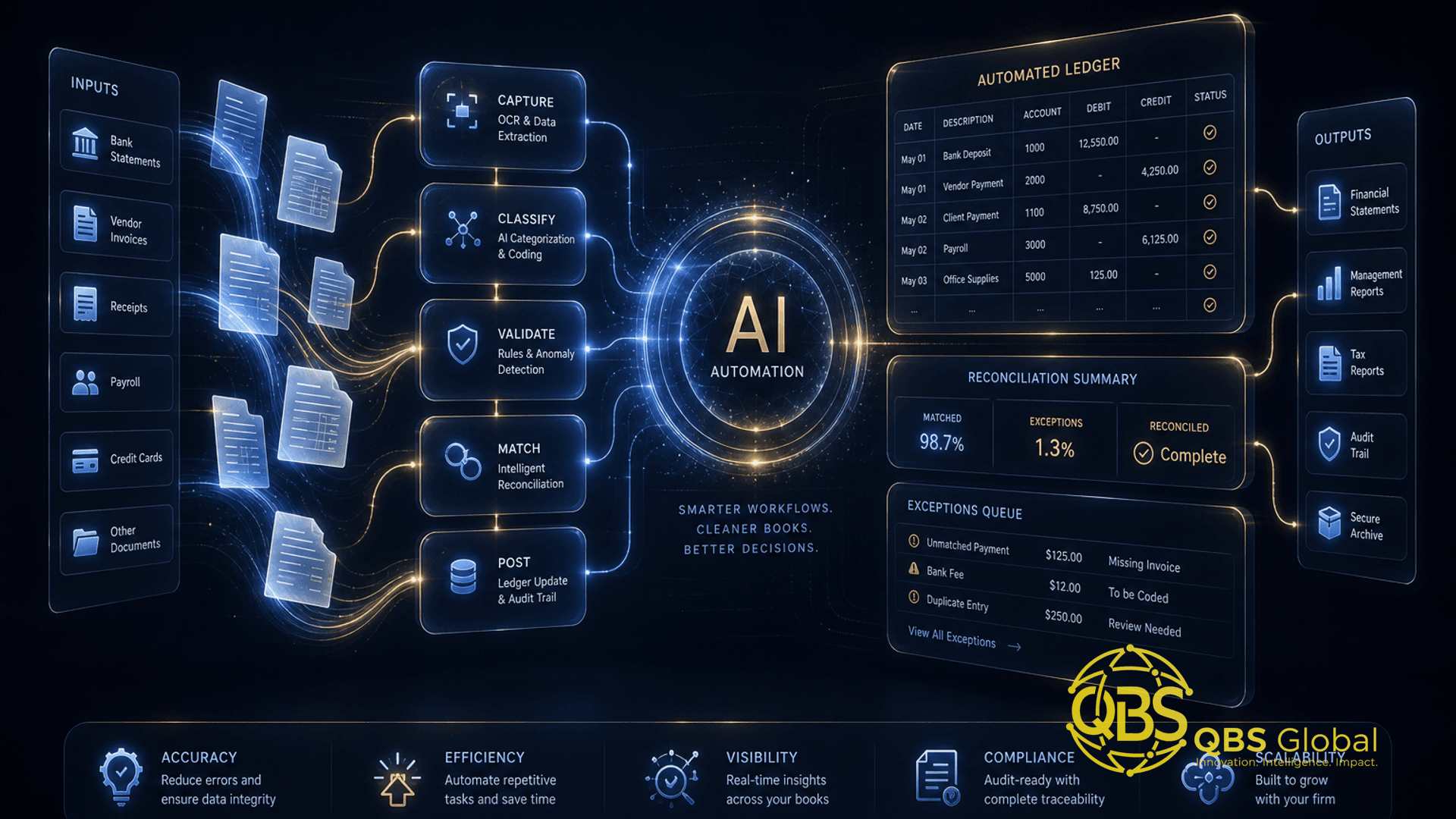
- Intake and extraction. When a document arrives, AI reads it, identifies the type, extracts key fields, and flags anything low-confidence.
- Validation. Math checks, duplicate detection, and missing-field flags route only true exceptions — typically under 10% — to a person.
- Write to ledger. Clean data posts to QuickBooks or Xero via API; the rest files itself with metadata.
- Status visibility. Your team sees one dashboard of who's complete and who's holding up the close.
Why this is a build, not a buy: no single subscription spans the client portal, the reminder logic your way, the extraction, and the ledger write-back with your firm's review rules baked in. The commodity pieces (OCR, the ledger) you still buy — you're building the orchestration that connects them. That's the highest-leverage custom work for a small firm, and it's the same pattern we describe in our broader guide to AI automation for service businesses.
Effort honesty: a single workflow like this is a few weeks of build for a competent developer, not a six-month platform. The discipline is to scope it to one painful workflow, ship it, prove it, then expand.
Integration realities: QuickBooks, Xero, and your existing stack
This is where build estimates quietly inflate, so price it in honestly. Both QuickBooks Online and Xero expose mature REST APIs and sit inside large connector ecosystems (Zapier, Make, n8n all have native integrations). For reading balances, creating bills, posting journals, and matching transactions, the happy path is well-trodden.
The friction lives in the details:
- Custom fields and chart-of-accounts quirks. Every firm's setup is a little different; mapping yours reliably takes iteration.
- Rate limits and sync timing. APIs throttle. A naive bulk job hits limits fast, so real builds need queuing and retry logic.
- Auth and token refresh. OAuth tokens expire; a production workflow has to renew them quietly or it silently breaks on a Monday.
- The edge cases. Multi-currency, partial matches, voided transactions, and amended returns are where 20% of the work hides.
- Audit trail. Anything that writes to the ledger needs logging your reviewers and auditors trust.
The practical lesson: "it integrates with QuickBooks" is true and also incomplete. Native connectors get you 80% of the way for standard cases; the remaining 20% — the part specific to your firm — is precisely the build effort you're paying for. Budget for it instead of being surprised by it.
Cost-to-build vs SaaS subscriptions over 3 years
Here's the comparison that actually decides it. The mistake is comparing a one-time build price to one month of SaaS. The honest comparison runs over three years, and it accounts for the fact that per-seat tools scale with your headcount and client count while a build is mostly paid for once.
These are planning ranges, not quotes — your numbers depend on scope, region, and how custom your workflow is. Treat them as a model to fill in, not gospel.
| Cost factor | Buy (per-seat SaaS) | Build (custom workflow) |
|---|---|---|
| Upfront | Low / near zero | One-time build (rough range: low-to-mid four figures up to low five figures per workflow) |
| Ongoing monthly | Per-seat × team size, rising as you grow | Hosting + maintenance (modest, relatively flat) |
| Scaling cost | Compounds with every new hire and client | Largely fixed once built |
| Customization | Limited to vendor's roadmap | Exactly your workflow |
| Lock-in / switching | High — your process lives in their tool | You own it |
| Maintenance burden | Vendor handles it (you pay for it) | You own it (budget for it) |
How to read this: SaaS wins early and for commodity work — low upfront, vendor maintains it, you're live this week. Building wins when (a) the per-seat bill compounds past the cost of owning the workflow, or (b) the workflow is your differentiator and no tool fits. Before you commit either way, it helps to rank your processes — our checklist for which business processes to automate first scores candidates by volume, repeatability, and risk so you spend the budget on the workflow that pays back fastest.
One more lever most firms forget: delivery cost. A lot of "we need to automate it" is really "this manual work is too expensive at local rates." Before you build, it's worth pricing whether offshore bookkeeping and accounting staff handle the exception tail more cheaply than either a subscription or a custom app — often the right answer is a blend: automate the volume, staff the judgment, build only the glue.
How to pilot one workflow before committing
Never roll automation across the whole firm on faith. Pilot one workflow, measure it honestly, and let the numbers make the call. Here's the sequence that de-risks it:
- Pick one workflow. High volume, low judgment, clearly painful. Document intake/follow-up or AP are the usual first picks. One — not three.
- Baseline it first. Before you change anything, measure today's reality: minutes per item, error rate, and turnaround time. Without a baseline you can't prove savings, and you'll argue about feelings instead of facts.
- Run in parallel. For two to four weeks, run the automation alongside the manual process. Compare outputs item by item. This catches extraction errors and edge cases before they touch a real client.
- Tune the exceptions. Watch what gets flagged and what slips through. Adjust the rules. The goal is a trustworthy exception queue, not zero human involvement.
- Measure against the baseline. Time saved, error rate, turnaround. If the workflow doesn't beat your baseline on at least two of three, don't cut over — fix it or kill it.
- Cut over, then expand. Once the numbers hold, switch primary processing to the automation and only then move to the next workflow.
The whole point of a pilot is to make the build-vs-buy decision with evidence instead of a sales deck. Run the parallel test with a trial of a SaaS tool and a scoped prototype of a custom flow, and the better fit usually becomes obvious within a month.
The shortest honest summary: buy the commodity layers — AP extraction, bank matching, tax research — and build only the orchestration and client-facing logic that's specific to your firm. Most small firms end up with a blend, not a religion. The hours you reclaim aren't the goal in themselves; they're the close you ship on time, the advisory work you finally have room for, and the clients who feel chased for rather than chased down.
If you'd like a tailored roadmap for your firm — which workflow to automate first, what to buy versus build, and a realistic cost model — book a free 30-minute call with QBS Global and we'll map it with you within 48 hours. We automate the busywork so your team can get back to the judgment work.
Frequently asked questions
Should a small accounting firm build or buy AI automation?+
Buy first for standard work like AP, document intake, and reconciliation where mature tools already exist, and build custom only for the one or two workflows that are unique to your firm or that per-seat SaaS pricing makes too expensive at your volume.
Where do small CPA firms actually lose the most hours?+
Manual data entry and reconciliation dominate — industry research puts data entry alone at roughly 40% of an accountant's time, or about 16 hours a week, with month-end close, AP, and client document chasing close behind.
What can off-the-shelf accounting AI tools not do?+
They struggle with firm-specific logic, deep cross-app workflows, anything outside their native integrations, and bespoke client reporting — that's where a custom workflow built on tools like n8n or a small app earns its keep.
How much does it cost to build a custom accounting automation?+
A single well-scoped workflow typically runs a few thousand to low five figures to build, plus modest monthly hosting and maintenance — the real comparison is that one-time build versus per-seat SaaS that compounds every year as you add staff and clients.
Does AI automation integrate with QuickBooks and Xero?+
Yes — both have robust APIs and large connector ecosystems, so most intake, AP, and reconciliation workflows can read and write to them, though edge cases, custom fields, and rate limits are where build effort actually goes.
What is the safest way to pilot accounting automation?+
Pick one high-volume, low-judgment workflow, run the automation in parallel with your manual process for two to four weeks, measure time saved and error rate against a baseline, and only cut over once the numbers hold.