Which Business Processes to Automate First: A Free Prioritization Checklist & Roadmap Template
A free, vendor-neutral checklist to decide which business processes to automate first plus a scoring model, 2x2, and 90-day roadmap template.
You sat down to "automate the business," opened a blank automation tool, and froze. Twenty processes feel painful. Three feel urgent. Everyone on the team has an opinion about what should go first. So you either automate the loudest complaint, or you automate nothing and the program quietly dies.
That stall is the norm, not the exception. As many as 30 to 50 percent of initial automation projects fail outright, according to consultancy EY (Ernst & Young, via Xenith). The technology almost never fails. The selection does — teams automate something that looked repetitive but wasn't, or a process so fragile the bot broke the first time reality changed. This guide is the fix: a simple scoring model, a 2x2 you can fill in this afternoon, a worked example, and a free roadmap template for sequencing your first 90 days. No vendors required.
Why most automation programs stall (they automate the wrong thing first)
The instinct is to automate whatever hurts the most. That is almost always a mistake. The most painful process is usually painful because it is messy, judgment-heavy, or constantly changing — which makes it the worst possible first automation. You spend six weeks wiring it up, the rules shift, the automation breaks, and the whole team concludes "automation doesn't work here."
The second trap is the opposite: automating something trivial that runs twice a month, where the time saved never adds up to the time you spent building it.
There is real opportunity being left on the table. McKinsey's analysis found that about 60 percent of all occupations have at least 30 percent of their activities that could be automated with already-demonstrated technology, even though under 5 percent of jobs can be fully automated (McKinsey Global Institute). And the everyday cost is concrete: in Smartsheet's workplace survey, over 40 percent of workers said they spend at least a quarter of their work week on manual, repetitive tasks, and nearly 60 percent believed they could save six or more hours a week if those tasks were automated (Smartsheet).
The point is not "automate everything." It is pick correctly, in order. A good first automation is boring, frequent, rules-based, and high-volume — the kind nobody brags about but everybody benefits from. That is what makes the rest of the program possible.
Takeaway: The right first process isn't your worst one. It's the boring, high-volume, rules-based one that compounds quietly every single week.
The scoring model: frequency x time x error-rate x complexity
You need a number, not a debate. Here is the one we use. Score every candidate process on four factors, then combine them.
Value score = (Frequency x Time-per-run x Error-rate) ÷ Complexity
Rate each factor 1 to 5:
| Factor | What it measures | Score 1 (low) | Score 5 (high) |
|---|---|---|---|
| Frequency | How often the process runs | Monthly or less | Many times a day |
| Time-per-run | Hands-on minutes each time | Under 5 min | Over 60 min |
| Error-rate | How often mistakes happen / cost of an error | Rarely, low stakes | Often, costly |
| Complexity | How hard it is to automate reliably | Plug-and-play | Custom build, many edge cases |
Multiply the first three, divide by complexity. The processes with the highest scores are your candidates — high volume, time-consuming, error-prone, and not a nightmare to build.
Two rules keep this honest:
- Complexity is a divisor, not a tiebreaker. A medium-value process that's trivial to automate often beats a high-value one that needs a six-week custom build. Easy wins fund hard ones.
- Be brutal about error-rate. A process that "feels fine" but quietly causes one wrong invoice a week is a hidden goldmine — automation kills the error class entirely, not just the time.
If you only have ten minutes, score your top five processes on a napkin. The ranking will surprise you. The thing you assumed should go first usually lands third or fourth, behind a piece of admin nobody was complaining about.
Quick wins vs strategic bets: a 2x2 you can fill in
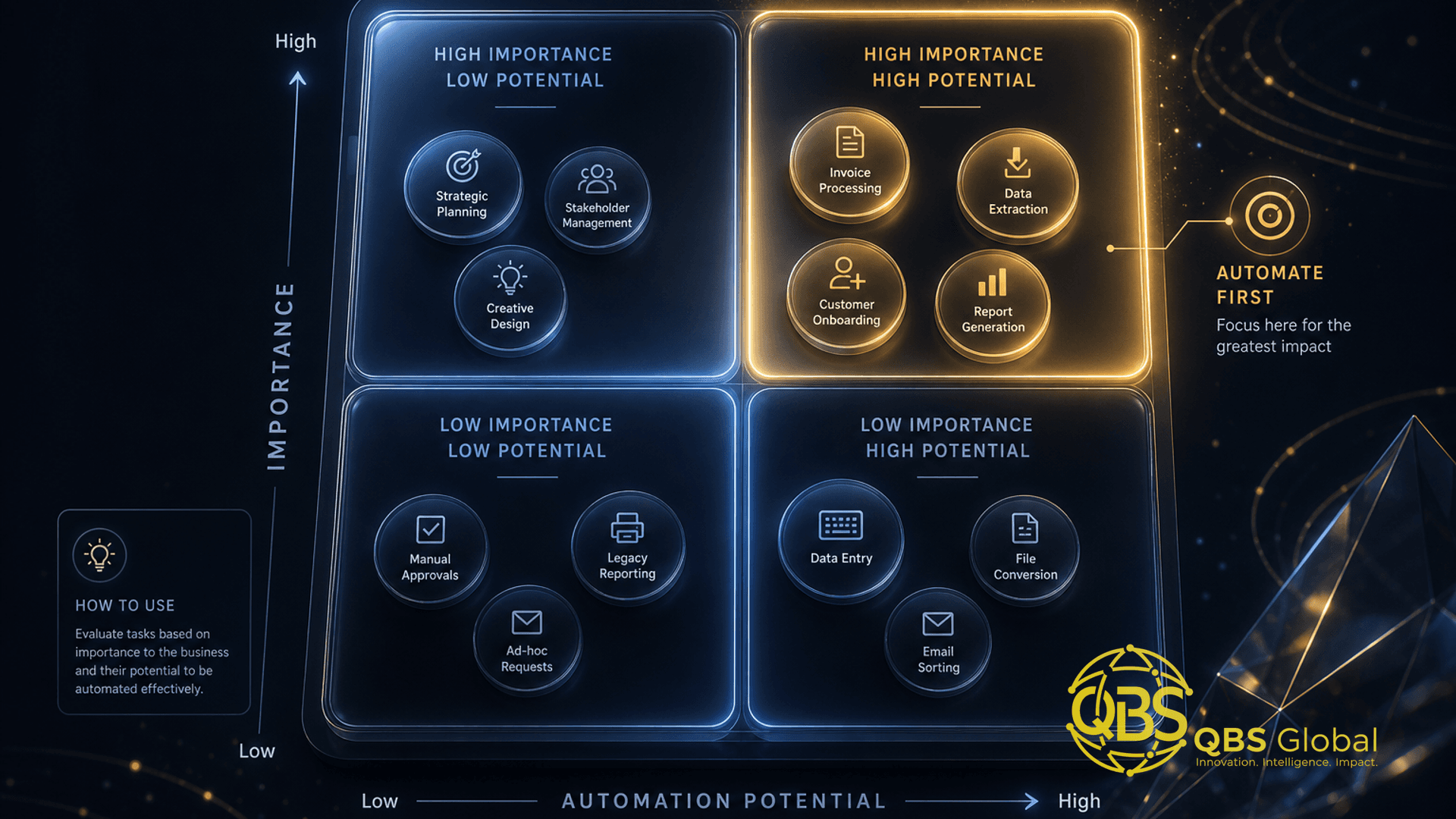
The scoring model gives you a ranked list. The 2x2 tells you what to do with it. Plot each process on two axes: business value (how much time, money, or risk it removes) and implementation effort (cost and complexity to build).
| Low effort | High effort | |
|---|---|---|
| High value | ⚡ Quick wins — do these first | 🎯 Strategic bets — plan, then build |
| Low value | 🧹 Fill-ins — batch when idle | ❌ Money pits — leave manual |
Here is how to treat each quadrant:
- Quick wins (high value, low effort): Your first 90 days live here. Off-the-shelf or no-code, payback in weeks, momentum and budget for everything after.
- Strategic bets (high value, high effort): Real ROI, real engineering. Worth doing — after quick wins have proven the program and freed up the team. Never start here.
- Fill-ins (low value, low effort): Cheap and harmless. Batch them when someone has a slow afternoon. Don't let them jump the queue.
- Money pits (low value, high effort): The trap. Hard to build, little payoff. Leave them manual and feel good about it.
The discipline is sequencing, not just sorting. Spend your first cycle entirely in the quick-wins box. Each win banks hours and credibility you'll spend on the strategic bets later. Programs that open with a strategic bet are the ones that stall before they ship anything.
Takeaway: Win the quick-wins quadrant first. It buys you the time, trust, and budget to afford the strategic bets — not the other way around.
Walking through a real prioritization example
Let's make this concrete with a small service business — say a 15-person agency drowning in operational admin. They list five candidate processes and score each 1 to 5.
| Process | Frequency | Time/run | Error-rate | Complexity | Value score |
|---|---|---|---|---|---|
| New-client onboarding handoff | 4 | 5 | 4 | 2 | 40.0 |
| Invoice creation + chasing | 5 | 3 | 4 | 2 | 30.0 |
| Weekly status reports to clients | 5 | 4 | 2 | 3 | 13.3 |
| Lead intake + routing from forms | 5 | 2 | 3 | 1 | 30.0 |
| Annual contract renewals | 1 | 5 | 5 | 4 | 6.25 |
Read the result, not the gut feel. The team thought contract renewals were the priority — they're stressful and high-stakes. But renewals run once per client per year and are genuinely complex, so they score lowest. Onboarding handoffs win, followed by a tie between invoicing and lead routing.
Now drop the top three onto the 2x2:
- Lead intake + routing is the cleanest quick win — complexity of 1, runs constantly. It's a simple no-code flow from form to CRM to assigned owner. Ship it first.
- Invoice creation + chasing is the next quick win — slightly more setup, but it removes a recurring error class (missed and late invoices) that directly affects cash.
- Onboarding handoff scores highest on value but is a strategic bet the moment you look closely: it touches contracts, kickoff scheduling, access provisioning, and three different tools. Plan it properly after the first two wins are banked.
That's the whole method. The highest-value process didn't go first — the lowest-friction one did, because it builds the runway for the bigger build. If you want the dollar side of this trade-off, our breakdown of the cost to automate a business process for a small business shows where the money actually goes.
The free roadmap template (how to use it)
You don't need software for this. The whole template is one spreadsheet with three tabs.
Tab 1 — Process inventory. One row per candidate process. Columns: process name, owner, the four scores (frequency, time, error-rate, complexity), the calculated value score, and the 2x2 quadrant. List everything that smells repetitive. Aim for 10 to 20 rows — enough to see patterns, few enough to finish in an afternoon.
Tab 2 — The 2x2. A simple scatter: value score on one axis, complexity on the other. Color-code by quadrant. This is the page you show stakeholders — it makes the sequencing argument for you, visually, so the loudest voice in the room doesn't win by volume.
Tab 3 — The 90-day plan. Pull the top quick wins into a dated sequence with an owner, a target ship date, and a single success metric (hours saved per week is the cleanest). This is the tab you actually run the program from.
To build it:
- Brain-dump every repetitive process into Tab 1 — don't filter yet.
- Score each row honestly. Where you're unsure on complexity, round up.
- Sort by value score, then assign quadrants in Tab 2.
- Sequence the top three to five quick wins into Tab 3 with dates and owners.
- Re-score quarterly. New tools change the complexity column; a six-week build last year might be a one-day no-code flow now.
One honest caveat: a spreadsheet is the right tool for planning automation, not for running the business. If you're already managing live operational data in spreadsheets and they're creaking, that's a different problem — here are the signs you've outgrown spreadsheets and need a custom tool. For the roadmap itself, though, a spreadsheet is perfect. Don't over-engineer the planning of your engineering.
Sequencing your first 90 days of automation
A ranked list is not a plan until it has dates. Here's the cadence that keeps momentum without burning the team out.
Days 1–30: Map, score, and ship one win. Build the inventory, run the scoring, and — critically — ship one quick win in this window. Not three. One. The goal is a visible, working automation removing real hours before the program loses energy. Pick the lowest-complexity item on your quick-wins list, even if it isn't the single highest value. A shipped automation beats a perfect plan.
Days 31–60: Stabilize and add two more. Watch the first automation under real load — the edge cases you missed always surface in week two. Fix them, then add the next two quick wins. By day 60 you should have three live automations and a number you can point to: "we've removed roughly X hours a week." That number is your budget for everything that follows.
Days 61–90: Start one strategic bet. Now — and only now — open the high-value, high-effort box. Scope one strategic bet properly: write down the edge cases, decide build-vs-buy, set a realistic timeline. You're not finishing it in this window; you're starting it from a position of proven momentum rather than blank-page panic.
Takeaway: One shipped quick win in the first 30 days beats a flawless plan that ships nothing. Momentum is the real deliverable.
Across all three phases, measure hours saved per week per automation and nothing fancier. It's the metric that survives a budget conversation. If you want a deeper operational view of how these pieces fit into day-to-day service delivery, see our guide on AI and workflow automation for service-business operations.
When to build vs buy vs leave it manual
Every process in your top quadrant forces one more decision: do you buy a tool, build something custom, or leave it as-is? Get this wrong and a great candidate becomes a money pit.
| Path | Choose it when | Watch out for |
|---|---|---|
| Buy (off-the-shelf / SaaS) | A tool already covers 80%+ of the need; the process is standard (invoicing, scheduling, email) | Subscription creep; forcing your process to fit the tool's assumptions |
| Build (custom / no-code) | The process is a genuine differentiator no tool fits; you need it wired to your own data and systems | Underestimating edge cases and maintenance; build-it-and-forget-it rot |
| Leave manual | Low volume, rare runs, or rules that change constantly | "We'll automate it later" becoming permanent; revisit when frequency rises |
A few rules that keep the decision clean:
- Default to buy. If an existing tool covers most of the need, the fastest ROI is almost always integration, not invention. Reserve building for the processes that are actually yours.
- Build for the differentiator, not the chore. Custom engineering should go where a generic tool would erase your edge — your specific intake logic, your pricing rules, your client experience — not on a task three SaaS products already solve.
- "Leave manual" is a valid, smart answer. Automating a rare or constantly-changing process costs more than it saves. The skill is knowing what not to automate.
- Never automate a broken process. Fix or standardize it first — otherwise you've just built a machine to do the wrong thing faster, at scale.
Between pure off-the-shelf and full custom code sits a large, capable middle: orchestration tools that connect the apps you already pay for. If a developer feels like overkill, our walkthrough of n8n automation for businesses without a developer shows how far you can get with no-code glue before committing to a custom build.
The honest summary: most first automations should be bought and configured, a handful of strategic bets justify building, and a quietly large number of processes are best left exactly as they are — for now.
If you'd rather not run the scoring exercise solo, that's worth a conversation — book a free 30-minute call with QBS Global and we'll walk your process list, fill in the 2x2 with you, and hand back a tailored prioritization roadmap within 48 hours. No tools to buy, no obligation — just a clear, ordered list of what to automate first.
Frequently asked questions
Which business process should I automate first?+
Start with the process that scores highest on frequency multiplied by time-per-run multiplied by error rate, divided by complexity. In practice that is usually a high-volume, rules-based admin task like invoice intake, lead routing, or onboarding handoffs, not your most painful process.
How do I prioritize processes for automation?+
Score every candidate on four factors: how often it runs, how long each run takes, how error-prone it is, and how complex it is to automate. Then plot them on a quick-wins-versus-strategic-bets 2x2 and sequence the high-value, low-complexity items first to fund the harder ones.
What processes should you never automate?+
Avoid automating processes that are rare, change constantly, depend on human judgment or relationships, or are still broken. Automating a broken process just makes you do the wrong thing faster, so fix or standardize it before you wire it up.
Should I build, buy, or keep a process manual?+
Buy when an off-the-shelf tool covers 80 percent or more of the need, build when the process is a genuine competitive differentiator no tool fits, and leave it manual when volume is low or the rules change too often to be worth the engineering.
How long does it take to see ROI from automating a process?+
For a well-chosen quick win the payback is often weeks, not months, because you are removing recurring hours every week. Strategic builds take longer to break even, which is exactly why you sequence quick wins first to build momentum and budget.
What is a good first 90-day automation roadmap?+
Spend the first 30 days mapping and scoring processes and shipping one quick win, days 31 to 60 stabilizing it and adding two more, and days 61 to 90 starting one strategic bet while measuring hours saved so you can prove value and reinvest.