How to Automate Your Business With n8n (No Developer Required) — A Service Firm's Guide
A plain-English guide to n8n automation for business without a developer: what to build first, where DIY breaks, and when to hire a builder.
If you have spent any time online in 2026, you have seen the name n8n — usually next to a video promising to replace your whole team with a no-code workflow. The hype is loud, and a lot of it is noise. But the underlying signal is real: n8n is genuinely having a breakout moment, and for service-business owners drowning in repetitive admin, it is worth understanding what it can and cannot do for you.
This guide is the honest version. No "fire your staff" fantasy, no affiliate-link tutorial. Just a clear, operator-level walkthrough of how to automate your business with n8n without a developer — what to build first, where the no-code ceiling is, how to add AI steps safely, what it really costs, and when to build it yourself versus have it built. Vendor-neutral, founder-to-founder.
What n8n Is and Why It Broke Out in 2026 (vs Zapier/Make)
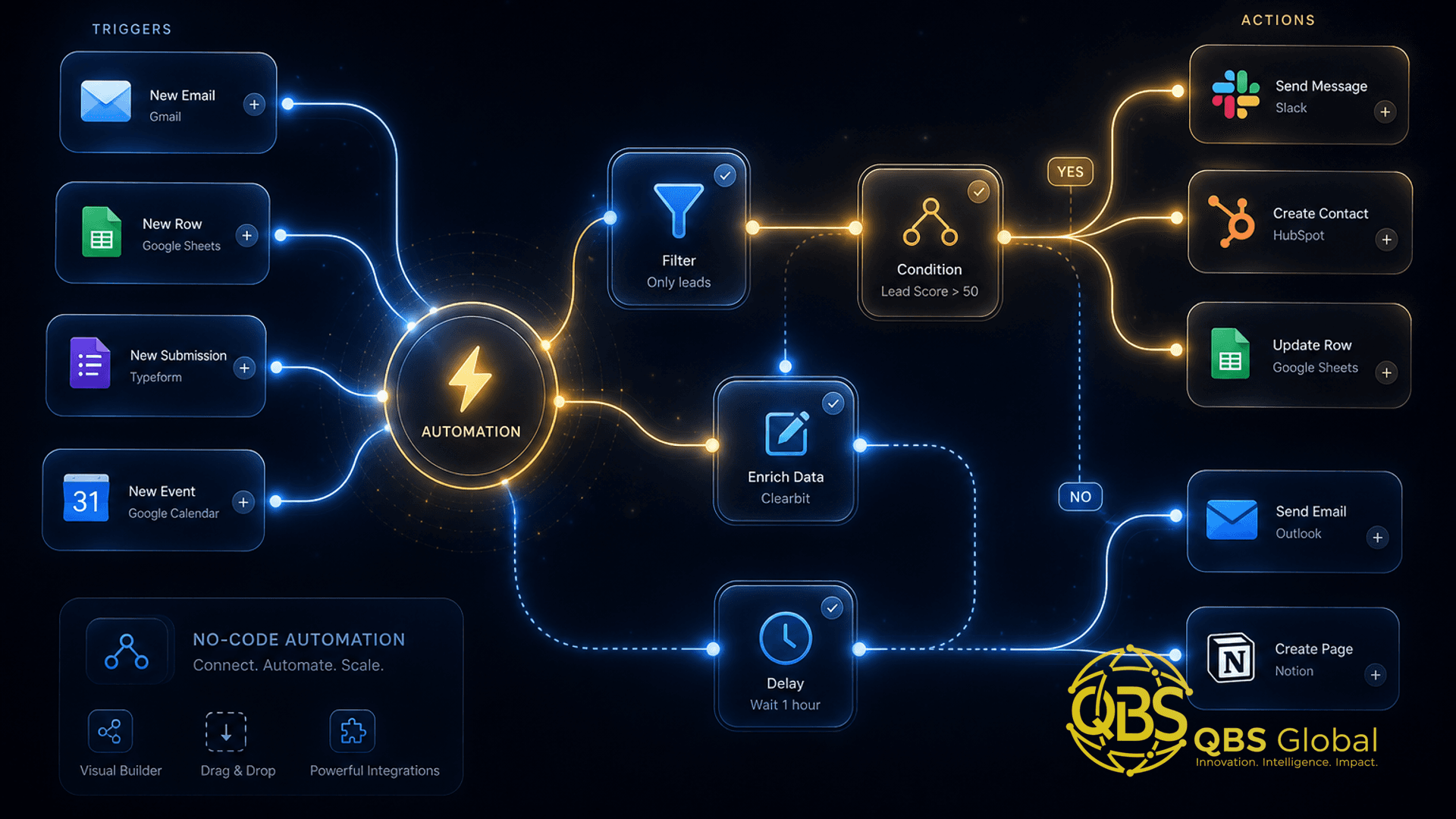
n8n (pronounced "n-eight-n," short for "nodes") is a workflow automation platform. You build automations by dragging "nodes" onto a visual canvas and connecting them — a trigger fires (a new email, a form submission, a scheduled time), and a chain of actions runs (update a sheet, send a Slack message, call an API, ping an AI model). It is the same basic idea as Zapier or Make, with three differences that matter.
First, it is open-source and can be self-hosted, which means you can run it on your own server and keep your data entirely under your control. Second, it bills per workflow execution rather than per individual task, which gets dramatically cheaper as your automations grow more complex. Third, it was built AI-first, so wiring a language model into a workflow is a native feature, not a bolt-on.
The breakout is not just vibes. In October 2025, n8n raised a $180 million Series C at a $2.5 billion valuation, with Nvidia's venture arm among the backers, per n8n's announcement and reporting from CRN. Its open-source project has crossed 194,000 GitHub stars, per n8n's pricing page. And on Google Trends, the entire cluster of searches around n8n — price, API, automation, "what is n8n" — is flagged "Breakout," meaning interest has spiked far above its baseline.
Here is how the three main players compare for a service business:
| Factor | n8n | Zapier | Make |
|---|---|---|---|
| Ease for total beginners | Moderate | Easiest | Moderate |
| Pricing model | Per workflow execution | Per task | Per operation |
| Self-host / data control | Yes (open-source) | No | No |
| AI / LLM steps | Native, first-class | Add-on | Supported |
| Best when | Complex or higher-volume workflows | Simplest first automations | Visual multi-step flows |
The takeaway: Zapier is still the gentlest on-ramp. But n8n wins the moment your automations get more elaborate, higher-volume, or data-sensitive — which is exactly the direction most growing service firms head.
5 Real Service-Business Workflows You Can Automate First
Skip the clever stuff. The best first automations are the boring, repetitive tasks that quietly eat your week. Small-business owners lose an average of about 96 minutes of productivity every day — roughly three weeks a year — per a Slack/Salesforce survey of 2,000 US owners, and entrepreneurs report spending around 36% of their working week on administrative tasks like invoicing and data entry, per an ACCA-cited survey. That is the pile n8n is built to shrink.
Here are five workflows almost any service firm can build first, in roughly increasing order of ambition:
- Lead capture and routing. A form fills out on your site, n8n catches it, enriches it, drops it into your CRM or a sheet, and sends you (or the right teammate) an instant notification. No lead sits unseen.
- New-client intake. When a deal is marked "won," n8n fires the welcome email, creates the project folder, sends the intake questionnaire, and schedules the kickoff — the same sequence you do by hand every time.
- Invoice and payment chasing. On a schedule, n8n checks for overdue invoices and sends a polite, escalating reminder series, so you stop manually nagging clients about money.
- Reporting and digests. Pull numbers from your tools each Monday and assemble a one-page summary — traffic, leads, pipeline, revenue — delivered to your inbox or Slack without you opening five dashboards.
- Inbox triage. Watch a shared inbox, classify each message (sales, support, spam, urgent), and route or auto-reply accordingly. This is where AI steps start to shine, which we will get to.
If you want the broader, tool-agnostic version of this — the highest-ROI workflows ranked with payback math — we wrote a fuller playbook on AI automation for service businesses. n8n is one good way to execute that list.
The takeaway: automate your fastest-bleeding manual task first, not the most impressive one. Save an hour a day before you try to save the world.
The DIY Ceiling: Where No-Code n8n Breaks and You Need a Developer
n8n's marketing leans hard on "no developer required," and for the five workflows above, that is largely true. But "no-code" does not mean "no engineering judgment." There is a real ceiling, and pretending otherwise is how DIY automations quietly become liabilities. Here is where it shows up.
Error handling and silent failures. The most common DIY mistake is building only the happy path. The workflow runs fine for three weeks, then an API changes, a field is empty, or a rate limit hits — and it breaks without telling anyone. You find out when a client asks why they never got onboarded. Production automations need retries, fallbacks, and alerts, and wiring those correctly is genuinely a developer's job.
Custom logic and data wrangling. The moment a workflow needs real conditional logic, data transformation, or a calculation the standard nodes do not cover, you drop into n8n's Code node and write JavaScript or Python — a hard wall for a non-technical operator.
Self-hosting, security, and compliance. Running the free self-hosted edition means you now own a server: updates, backups, SSL, access control, and keeping client data safe. If you handle anything sensitive — health, finance, personal data under GDPR — getting this wrong is a real risk, not a learning experience.
Scale and reliability. A workflow that runs ten times a day is forgiving. One that runs ten thousand times a day and touches money is a different animal that needs proper monitoring and design.
The takeaway: use no-code n8n to prove an idea works. Bring in a developer the moment the automation becomes something your business genuinely depends on — because the cost of a silent failure is always higher than the cost of building it right. Our deeper guide to AI workflow automation for service-business operations covers how to design these for reliability, not just function.
Adding AI Steps (n8n + LLMs) Without Writing Code
This is the part driving the 2026 surge — and the good news is it is genuinely accessible. n8n ships dedicated AI and LLM nodes, including an AI Agent node, so you can drop a language model into any workflow without writing a line of code. You connect your AI provider's API key (OpenAI, Anthropic, Google, or others), type a plain-English prompt into the node, and the model's output flows into the next step like any other data.
What does that unlock for a service business? Concretely:
- Classify and route incoming emails or form messages by intent ("is this a sales lead, a support issue, or spam?").
- Summarize long client emails, call transcripts, or documents into a two-line digest.
- Draft replies for a human to review and send — first-draft speed without losing the human check.
- Extract structured data from messy input: pull the name, company, and budget out of a free-text inquiry and write them straight into your CRM.
A practical pattern: let rule-based nodes handle the predictable plumbing (when X happens, do Y), and reserve the AI node for the one step that genuinely needs judgment — reading unstructured text and making a call. AI is the brain at a single decision point, not the engine for the whole flow. That keeps cost down and reliability up.
One honest caveat: AI steps add a cost-per-run (your model's API fees) and a small chance of a wrong answer. For anything customer-facing, keep a human in the loop until you trust it. The takeaway: adding AI to an n8n workflow is a checkbox-and-prompt exercise, not a coding project — but treat the AI as a smart assistant that still needs supervision.
Cost Reality: Self-Host vs Cloud, Free Tier vs When You Outgrow It
n8n's pricing is one of its biggest draws, but it is widely misunderstood. There are two completely different paths, and the right one depends on whether you would rather pay with money or with effort. All figures below are from n8n's official pricing page.
| Path | Cost | What you trade |
|---|---|---|
| Self-hosted Community Edition | Free software; you pay only for a server (often a few dollars a month) | You own setup, updates, security, and uptime |
| n8n Cloud — Starter | 20 euros/mo (billed annually), 2,500 executions | Convenience; capped on volume and advanced features |
| n8n Cloud — Pro | 50 euros/mo (billed annually), 10,000 executions | More executions, insights, admin roles |
| n8n Cloud — Business | 667 euros/mo (billed annually), 40,000 executions | Self-hosted with SSO, Git version control, scaling |
The key billing concept: n8n charges per execution — one full run of a workflow, no matter how many steps it contains — not per task or operation like some competitors. A workflow with 30 steps is still one execution. For multi-step automations, that pricing model is meaningfully cheaper, which is a large part of why n8n took off.
When does the free self-hosted tier make sense? When you (or someone you trust) are comfortable running a small server, and you want full data control or unlimited executions without per-run fees. When do you outgrow it? When the hours you spend babysitting the server, patching it, and fixing silent breakages cost more than a paid plan or a done-for-you build would. "Free" software is never free of time.
For a full breakdown of what business-process automation actually costs — tools, builds, and total cost of ownership — see our guide on the cost to automate a business process for a small business. The takeaway: the software is cheap; the real cost is the time to build it well and keep it running.
DIY vs Done-For-You: A Decision Checklist
Most of the regret around automation comes from picking the wrong path for a given workflow — DIY-ing something that needed an engineer, or paying for a build of something you could have clicked together in an afternoon. Run each workflow through this checklist before you decide.
| Question | If yes, lean DIY | If yes, lean done-for-you |
|---|---|---|
| Is the workflow simple and low-stakes? | Yes | — |
| Would a silent failure cost real money or trust? | — | Yes |
| Does it need custom code or complex logic? | — | Yes |
| Does it touch sensitive or regulated data? | — | Yes |
| Will it run at high volume or be business-critical? | — | Yes |
| Do you genuinely enjoy tinkering and have the time? | Yes | — |
| Are you spending more hours maintaining it than it saves? | — | Yes |
A simple rule of thumb: build the experiments yourself, buy the dependencies. If a workflow is a nice-to-have you are testing, DIY it in n8n — the learning alone is worth it. The moment it becomes load-bearing — something a client or your revenue relies on — amateur-hour error handling stops being acceptable, and a proper build pays for itself the first time it would have otherwise broken at 2am.
The takeaway: the question is rarely "n8n or not." It is "should this specific workflow be DIY or done right by someone who does this for a living."
How to Brief a Builder If You'd Rather Have It Done for You
If you decide a workflow is worth doing properly, a good brief saves you money and gets you a result that actually holds up. You do not need technical language — you need clarity about the business outcome. Give a builder these seven things:
- The trigger. What event should start it? ("When a contact form is submitted.")
- The steps. What should happen, in order, in plain English? Walk through how you do it by hand today.
- The tools. Which apps and accounts are involved (CRM, email, calendar, payment, AI provider)?
- The failure plan. What should happen when something breaks? Who gets alerted, and what is the fallback?
- The volume. How often does this run — ten times a day or ten thousand?
- Hosting and data. Cloud or self-hosted? Any compliance or data-residency requirements?
- The definition of done. How will you know it works? What does success look like in a week?
That last point is where DIY-minded owners most often go wrong: they accept a workflow that runs once in a demo as "done." Real done means it has run reliably and failed safely under real conditions — the testing, monitoring, and error handling that turn "it worked once" into "it works unattended."
A good automation partner will also push back — telling you when a workflow is a five-minute DIY job not worth paying for, and when the thing you described will quietly break in three weeks. That honest steer is most of the value. For a sense of where AI is heading next for front-line service tasks, our piece on the AI receptionist for service businesses in 2026 shows the more advanced end of this.
The takeaway: brief for the outcome and the failure modes, not the tool. The trigger, the steps, and "what happens when it breaks" are 90% of a good build.
n8n is a genuinely powerful tool, and the no-code path is real — you can and should automate your first few workflows yourself. The line worth respecting is the one between experiments and dependencies: build the former, get help with the latter. If you would rather skip the trial-and-error and have your busywork mapped, built, and made reliable from day one, book a free 30-minute call with QBS Global and we will send you a tailored automation roadmap within 48 hours — no obligation, just a clear plan for what to automate first.
Frequently asked questions
Can I really use n8n for my business without a developer?+
Yes — for most early workflows. n8n's visual canvas, pre-built nodes, and AI workflow builder let a non-technical operator wire up real automations like lead routing, intake, and reporting. You hit a ceiling when a workflow needs custom code, complex error handling, secure self-hosting, or compliance — that is when a developer earns their keep.
Is n8n free, and what does it actually cost?+
The self-hosted Community Edition is free and open-source, so you only pay for the server it runs on. n8n Cloud starts at 20 euros a month for the Starter plan (2,500 executions) and 50 euros a month for Pro (10,000 executions), billed annually, per n8n's official pricing page. You pay per workflow run, not per step, which is usually cheaper than per-task tools.
How is n8n different from Zapier or Make?+
All three connect apps without code, but n8n is open-source, can be self-hosted for full data control, and bills per full workflow execution rather than per task or operation. It is also more flexible for AI steps and custom logic. Zapier is the simplest to start with; n8n rewards you once your workflows get more complex or higher-volume.
Can n8n add AI without me writing code?+
Yes. n8n has dedicated AI and LLM nodes plus an AI Agent node, so you can drop a ChatGPT or other model step into a workflow to classify emails, summarize messages, draft replies, or extract data from forms — all configured visually. You connect your AI provider's API key and write a plain-English prompt, no programming required.
When should I hire someone instead of building it myself?+
Hire a builder when the automation touches revenue or compliance, when a failure would go unnoticed and cause damage, when it needs secure self-hosting, or when you are spending more hours maintaining the workflow than it saves. DIY is great for proving value; a professional build is for the workflows your business will actually depend on.
Will an automation I build in n8n keep working unattended?+
Only if it is built to fail safely. The most common DIY mistake is a workflow with no error handling, retries, or alerts — it breaks silently and you find out from an angry customer. Production-grade automation needs monitoring, logging, and fallbacks, which is the main thing a developer adds beyond the happy-path version.