AI Receptionists & Voice Agents for Service Businesses: What They Actually Replace (2026)
A vendor-neutral 2026 guide to the AI receptionist for service business owners: what it replaces, real costs, setup in a week, and how to avoid lock-in.
Search interest in "AI receptionist" went from almost nothing to a near-vertical climb over the past two years, and in mid-2026 it is one of the hottest queries in the small-business software space. The reason is simple: the technology finally crossed the line from robotic and frustrating to good enough that a caller often cannot tell. Every voice-AI vendor on the internet has noticed, and the search results are now wall-to-wall "sign up for our tool" pitches.
This is not one of those. We sell automation services, not a receptionist app, so we have no dog in the "which tool" fight. What follows is what an AI receptionist actually does in 2026, what it should and should not replace, what it really costs once you account for lock-in, how to deploy one in a week without touching your phone system, and the guardrails that keep it from embarrassing you. Read it before you sign anything.
What an AI Receptionist Actually Does in 2026
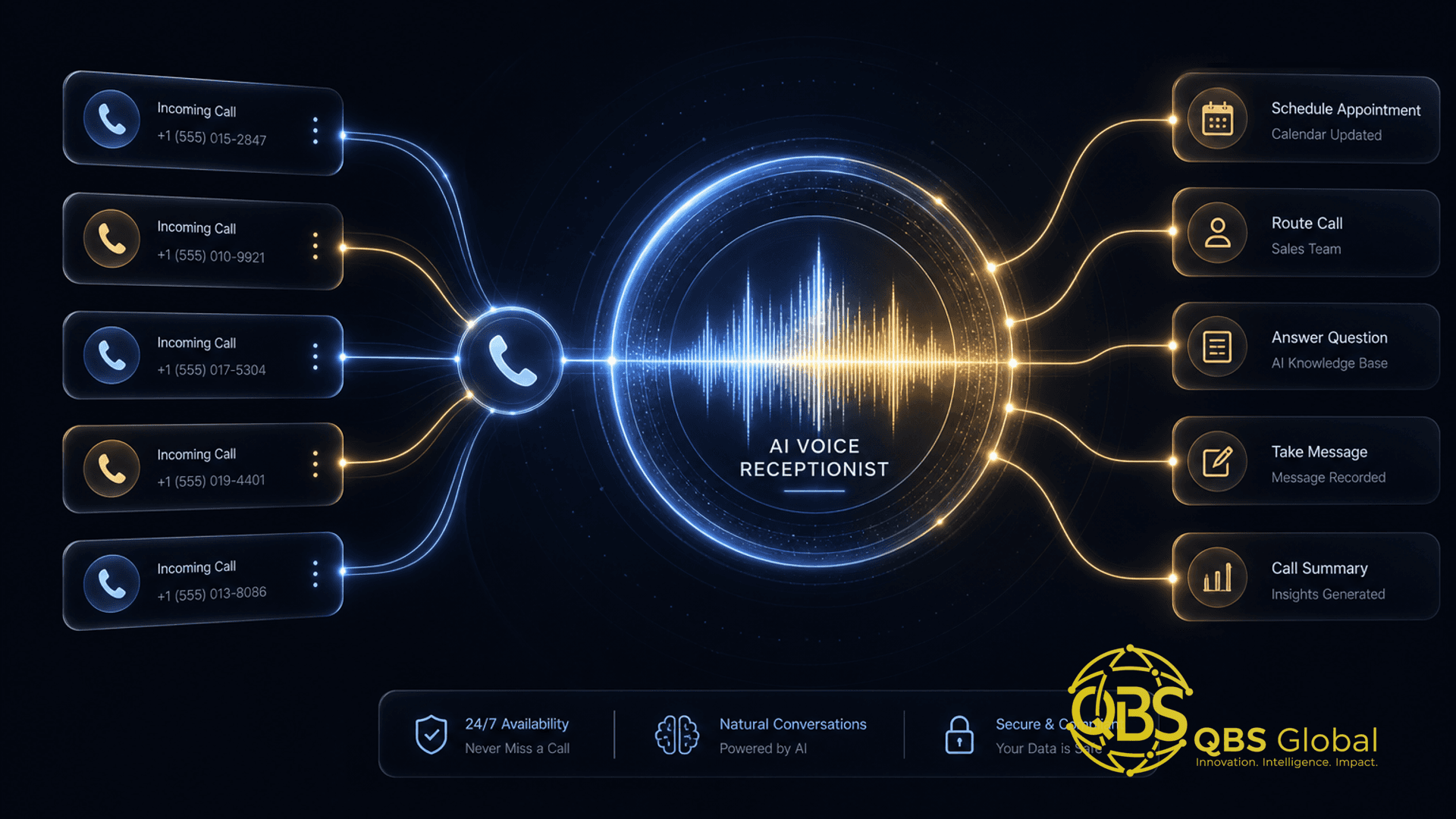
An AI receptionist is a voice agent: software that picks up a phone call, understands natural speech, holds a real back-and-forth conversation, and takes action. The 2026 generation does four core jobs well.
Call answering. It picks up on the first ring, 24/7, with no hold music and no voicemail. This is the single biggest source of value, because the calls a service business misses are pure lost revenue. Industry data on missed calls is brutal: roughly 62% of small-business calls go unanswered, around 85% of callers who hit voicemail never call back, and each missed call is commonly valued at $100–200 for a service business, per SchedulingKit's 2026 missed-call statistics roundup. Multiple call-tracking studies cited in Aira's missed-call data reach the same conclusion: the majority of business calls go unanswered, and most of those callers simply move on to your competitor. An agent that answers every call is recovering money you are already losing.
Booking. It checks a live calendar, offers real open slots, books the appointment, and sends the confirmation. For clinics, salons, trades, and any appointment-driven business, this is the workhorse function.
Triage and routing. It asks a few qualifying questions — what do you need, is this urgent, are you an existing customer — and routes accordingly: warm-transfer to a human, take a message, escalate an emergency, or schedule a callback. Good triage means your team only handles calls that actually need them.
FAQ handling. Hours, location, parking, pricing ranges, "do you take my insurance," "do you service my area." These repetitive questions eat your front desk's day, and an agent grounded in your own information answers them instantly and consistently.
The takeaway: in 2026 an AI receptionist is not a novelty auto-attendant. It is a competent first-line phone worker that answers, books, triages, and informs — and its main job is to stop revenue leaking out through unanswered calls.
What a Voice Agent Replaces vs. What You Should Keep Human
The mistake owners make is asking the AI to replace the whole front desk. It should not. Map your calls to the matrix below and you will see the line clearly.
| Call type | AI receptionist | Keep human |
|---|---|---|
| After-hours and weekend calls | ✅ | |
| Overflow when lines are busy | ✅ | |
| Routine booking and rescheduling | ✅ | |
| Repetitive FAQs (hours, location, pricing) | ✅ | |
| First-pass lead qualification | ✅ | |
| Upset, anxious, or complaint calls | ✅ | |
| High-value sales closes and negotiation | ✅ | |
| Clinical, legal, or financial judgment | ✅ | |
| Complex problem-solving with edge cases | ✅ | |
| Anything where a wrong answer is expensive | ✅ |
The pattern: the AI takes the high-volume, rule-based, low-stakes calls, and the moment a call needs judgment, empathy, or accountability, it hands off to a person. A well-designed agent does not pretend to be human or try to win the hard call — it captures the easy 70% so your people can be excellent on the hard 30%.
This is the same logic that governs AI automation for service businesses generally: automate the predictable, keep the human where human judgment is the product. If you want the broader version of where AI fits across a service firm, our breakdown of AI use cases for professional services firms maps it across intake, delivery, and reporting, not just the phone.
The goal is not a robot that replaces your receptionist. It is a tireless first responder that makes sure no caller ever hits a dead line — and that your humans only spend their hours on the calls worth their time.
Real Cost: Per-Minute vs. Flat-Fee vs. Build-Your-Own
Pricing for AI receptionists falls into three models, and the sticker price is the least important part. The numbers below are typical 2026 market ranges based on how vendors structure their plans — treat them as rough estimates to frame your own math, not quotes.
| Model | How you pay | Roughly | Best for | Watch out for |
|---|---|---|---|---|
| Usage-based (per minute) | Cents per minute of talk time | ~$0.10–$0.40/min | Low or spiky call volume | Cost balloons as you grow; hard to forecast |
| Flat-fee SaaS | Fixed monthly plan, often with a minute cap | ~$50–$300+/mo | Predictable, moderate volume | Overage fees; features gated to higher tiers |
| Build-your-own | One-time build + low infra per minute | Low thousands up front | High volume, specific needs | Needs maintenance; needs a competent builder |
Three things matter more than the headline price.
Volume changes the answer. Per-minute looks cheap until you do real numbers. A few hundred minutes a month is nothing; a few thousand minutes a month at $0.30 is a four-figure monthly bill that a one-time build would have undercut quickly. Estimate your monthly call minutes before you choose a model.
Hidden lock-in is the real cost. Many off-the-shelf tools hold the parts that make switching hard: your call scripts and prompts live in their proprietary builder, your call recordings and transcripts sit in their database, your phone number may be ported into their system, and your integrations are wired to their platform. Leaving means rebuilding from scratch. Before you sign, ask: can I export my transcripts and recordings, do I keep my own number, and is my agent logic portable, or does it only run here?
The all-in number is what counts. Add the per-minute or subscription cost, any telephony fees, integration costs, and the hours someone spends maintaining scripts and reviewing calls. A "$99/month" tool with $200 of overage and three hours a week of babysitting is not a $99 tool. For a structured way to run this comparison across any automation, see our guide to the cost to automate a business process for a small business.
The takeaway: pick the pricing model by your call volume and your tolerance for lock-in, not by the lowest advertised number. Cheap-per-minute and cheap-per-month both get expensive at the points vendors do not advertise.
How to Set One Up in a Week Without Ripping Out Your Phone System
You do not need to change carriers, port your number, or rebuild your phone tree to pilot an AI receptionist. The standard approach layers it on top of what you already have using simple call forwarding. Here is a realistic one-week plan.
Day 1 — Decide the scope. Pick the smallest valuable use case. For most firms that is after-hours and overflow calls only — the calls you are currently losing entirely. Do not start by routing every call through the AI; start with the calls that go nowhere today.
Day 2 — Write the knowledge base. Gather the facts the agent needs: services, hours, location, pricing ranges, service area, booking rules, and the top 15 questions your front desk actually gets. This document is the single biggest driver of quality. Garbage in, garbage on the phone.
Day 3 — Build the call flow. Define the greeting, the qualifying questions, the booking logic, and — most important — the human handoff path: when and how the agent transfers to a person or takes a message. Keep the flow short. Long, branching scripts are where agents get lost.
Day 4 — Connect calendar and forwarding. Wire the agent to your scheduling tool so it books against real availability, and set conditional call forwarding on your existing line: forward to the AI only when unanswered after a few rings or outside business hours. Your main number does not change.
Day 5 — Test like a hostile caller. Call it yourself. Mumble. Give a hard-to-spell name. Ask something off-script. Try to book a slot that does not exist. Ask for a human. Note every failure.
Day 6 — Fix and tighten. Patch the knowledge gaps, add read-back confirmation for names and dates, and make the handoff trigger more aggressive if the agent over-held calls it should have transferred.
Day 7 — Go live narrow, then review. Turn it on for the limited scope, then read every transcript for the first week. The first week of real calls teaches you more than any amount of pre-launch planning.
The takeaway: start narrow, keep your number, forward only the calls you are already missing, and expand scope only after the transcripts prove it works. A week is enough to pilot; it is not enough to go all-in.
Where AI Receptionists Fail — and the Guardrails That Prevent It
Voice agents fail in predictable ways. Each failure has a known guardrail, and skipping the guardrail is how vendors end up with the horror stories.
It mishears names, addresses, and numbers. Phone audio is lossy and accents are real. Guardrail: force confirmation read-backs — "I have that as J-O-H-N, is that right?" — for every name, date, phone number, and address before the agent acts on it.
It hallucinates answers it does not have. Asked something outside its knowledge, a weak agent invents a confident wrong answer. Guardrail: ground the agent strictly in your knowledge base and instruct it to say "let me have someone follow up on that" instead of guessing. Never let it improvise on price, policy, or eligibility.
It loops when the caller goes off-script. Real callers interrupt, change their mind, and ramble. A brittle agent gets stuck. Guardrail: cap the number of retries on any step and escalate to a human or a callback after two failed attempts. A clean handoff beats a frustrated loop every time.
It fails to escalate when it should. The worst failure is trapping an upset or urgent caller with a bot. Guardrail: build an always-available human path — a keyword ("agent," "person"), an emergency branch, and an automatic handoff on detected frustration or repeated confusion.
It goes wrong silently. If nobody reviews calls, small failures compound for weeks. Guardrail: log and transcribe every call and review them — daily in week one, weekly after. The transcripts are your quality system.
The takeaway: none of these failures are mysterious, and none are acceptable surprises. Confirmation read-backs, a tight grounded knowledge base, retry caps, a hard human-handoff path, and reviewed call logs turn a risky bot into a reliable one. If your vendor or builder cannot show you these five guardrails, that is your answer.
Build vs. Buy: When a Custom Voice Agent Beats Off-the-Shelf
Most service businesses should buy first. An off-the-shelf tool gets you live in days, costs little to pilot, and proves whether a voice agent helps your specific call mix before you invest real money. Buying is how you learn cheaply.
You should consider a custom build when the off-the-shelf path starts working against you:
- Volume makes per-minute or per-seat pricing expensive — thousands of minutes a month where a one-time build pays for itself fast.
- Your process is genuinely specific — multi-step intake, unusual booking rules, or industry logic the generic tools cannot model.
- You need deep integration — the agent must read and write to your CRM, EHR, ticketing, or internal systems in real time, not via a brittle bolt-on.
- Lock-in has become a liability — you want to own your scripts, transcripts, number, and agent logic, and run it on infrastructure you control.
- Data and compliance demand it — call data must stay in systems and jurisdictions you choose, not a vendor's default.
A custom voice agent in 2026 is typically assembled from off-the-shelf parts — a speech-to-text model, a language model, a text-to-speech voice, a telephony layer, and your own logic and data — which is what keeps it portable and avoids the lock-in of a closed SaaS. The trade-off is that someone has to build and maintain it.
This is the same build-vs-buy calculus that applies to every automation decision, and we cover the full framework — including how to phase from off-the-shelf to custom without wasting the first spend — in build vs. buy: AI agents for service firms.
The takeaway: buy to learn, build to scale. Off-the-shelf proves the value; a custom agent captures it once volume, specificity, integration, or lock-in tips the math.
Deployment Checklist for Service Firms (Clinics, Agencies, Trades, B2B)
Different service firms have different stakes, but the deployment discipline is the same. Run this checklist before you go live, and adjust the emphasis for your type.
For everyone:
- Scope narrow first — after-hours and overflow before all-calls.
- Keep your existing number; use conditional forwarding, not a port.
- Write a real knowledge base with your top 15 FAQs.
- Define the human-handoff trigger explicitly.
- Turn on confirmation read-backs for names, numbers, and dates.
- Connect to your live calendar so bookings are real.
- Log and transcribe every call; review weekly.
- Confirm you can export transcripts, recordings, and your number.
Clinics and healthcare: treat patient data handling and privacy as a hard requirement, build a clear emergency-escalation branch ("if this is an emergency, hang up and call your local emergency number"), and never let the agent give clinical advice. Booking and FAQs only.
Agencies and B2B services: use the agent mainly for inbound qualification and routing — capture who, what, and budget signal, then warm-transfer or book a call with the right human. Do not let it attempt to close.
Trades (HVAC, plumbing, electrical): optimize for emergency triage and dispatch. The agent should distinguish "no heat in winter" urgency from a routine quote request, capture the address with a read-back, and escalate emergencies to an on-call human fast. Miss rates spike during peak season, which is exactly when overflow answering pays off most.
The takeaway: the checklist is universal; the emphasis is local. Get the eight common items right, then tune the escalation and data rules to your industry's stakes.
If you want a voice agent that fits your call mix without locking you into someone else's platform — or you just want a clear read on whether to buy off-the-shelf or build your own — book a free 30-minute call with QBS Global and we will map a tailored, vendor-neutral roadmap and send it to you within 48 hours.
Frequently asked questions
What is an AI receptionist for a service business?+
It is a voice AI agent that answers your phone, talks to the caller in natural language, and handles routine jobs like booking appointments, answering common questions, and qualifying or triaging the call before routing it. It runs 24/7 and can pick up calls your team would otherwise miss, which is where most of its value comes from.
What can an AI receptionist not do?+
It should not handle emotionally charged calls, complex negotiations, high-value sales closes, clinical or legal judgment, or anything where getting it wrong is expensive. Keep those human. The right design uses the AI for high-volume, rule-based, after-hours, and overflow calls, and hands off cleanly to a person when the call needs judgment.
How much does an AI receptionist cost in 2026?+
Pricing falls into three rough buckets: usage-based at roughly ten to forty cents per minute, flat monthly SaaS plans that commonly run from about fifty to a few hundred dollars a month depending on volume and features, and a custom build that is a one-time project starting in the low thousands plus low per-minute infrastructure costs. The cheapest on paper is not always cheapest in practice once lock-in is factored in.
Can I add an AI receptionist without replacing my phone system?+
Yes. Most setups keep your existing business number and simply forward calls, or a subset of calls such as after-hours and overflow, to the AI agent. You do not need to rip out your phone system, port your number, or change carriers to pilot one.
Where do AI receptionists most often fail?+
The common failure modes are mishearing names and addresses, hallucinating answers to questions outside their script, looping when a caller goes off-track, and failing to escalate to a human when they should. Every one of these is preventable with guardrails: confirmation read-backs, a tight knowledge base, a hard human-handoff path, and full call logging you review weekly.
Should I build a custom voice agent or buy an off-the-shelf one?+
Start by buying or piloting an off-the-shelf tool to prove the value quickly and cheaply. Move to a custom build only when call volume is high, your process is genuinely specific, you need deep integration with your own systems, or per-minute SaaS fees and lock-in start to outweigh a one-time build. Buy to learn, build to scale.