AI Client Intake for Law Firms: How to Automate Intake & Document Workflows (2026)
A practical guide to AI automation for law firm client intake — what to build, conflict checks, build vs buy, and how to pilot one workflow that converts.
A qualified prospect fills out your contact form at 9pm on a Tuesday. By the time someone at the firm reads it, runs a conflict check, drafts an engagement letter, and opens a matter, two days have passed — and the prospect has already called the next firm on their list. That gap is not a marketing problem. It is an intake problem, and it is quietly costing small firms real revenue.
This guide is an operator-grade walkthrough of AI automation for law firm client intake: what the workflow looks like end to end, how conflict checks and engagement letters fit in, where conversational intake beats a form, and how to decide between buying a suite and building a custom workflow. We wire automation like this for service firms for a living, so treat this as a build plan, not a brochure. Every hard number is cited so you can check it.
Why intake is the #1 operational bottleneck for small firms
Intake is the one process that touches revenue, ethics, and client experience at the same time — and in most small firms it runs on a person remembering to do things in order. That is exactly where it breaks.
The responsiveness data is brutal. In Clio's Legal Trends Report, only 33% of firms responded to a prospective client's email and only 40% answered the phone when contacted by a prospective client (Clio / 2Civility). The prospect does not wait. They sign with whoever responds first, and the firm that took two days to run a conflict check never finds out it was in the running.
The conversion math makes the cost concrete. The average law firm converts roughly 14% of inquiries into signed clients, while top performers convert 40-50% (LexGro). A huge share of that gap is not lawyering quality — it is intake speed and follow-up. And the upside of fixing it is measurable: Clio found that firms using client intake software bring in 51% more leads and 52% more revenue on average (Clio Legal Trends Report).
Meanwhile the profession is already moving. Adoption of AI tools among lawyers jumped from around 19% in 2023 to roughly 79% in 2025 (AllAboutAI, citing legal AI surveys). The question for a small firm is no longer whether to use AI — it is which workflow to point it at first. Intake is the obvious answer, because it is the one where a faster response converts directly into signed matters.
The takeaway: intake is the bottleneck because it is the slowest, most manual step standing between a hot lead and a paying client — and the data says fixing it pays for itself.
What an AI-assisted intake workflow looks like end to end
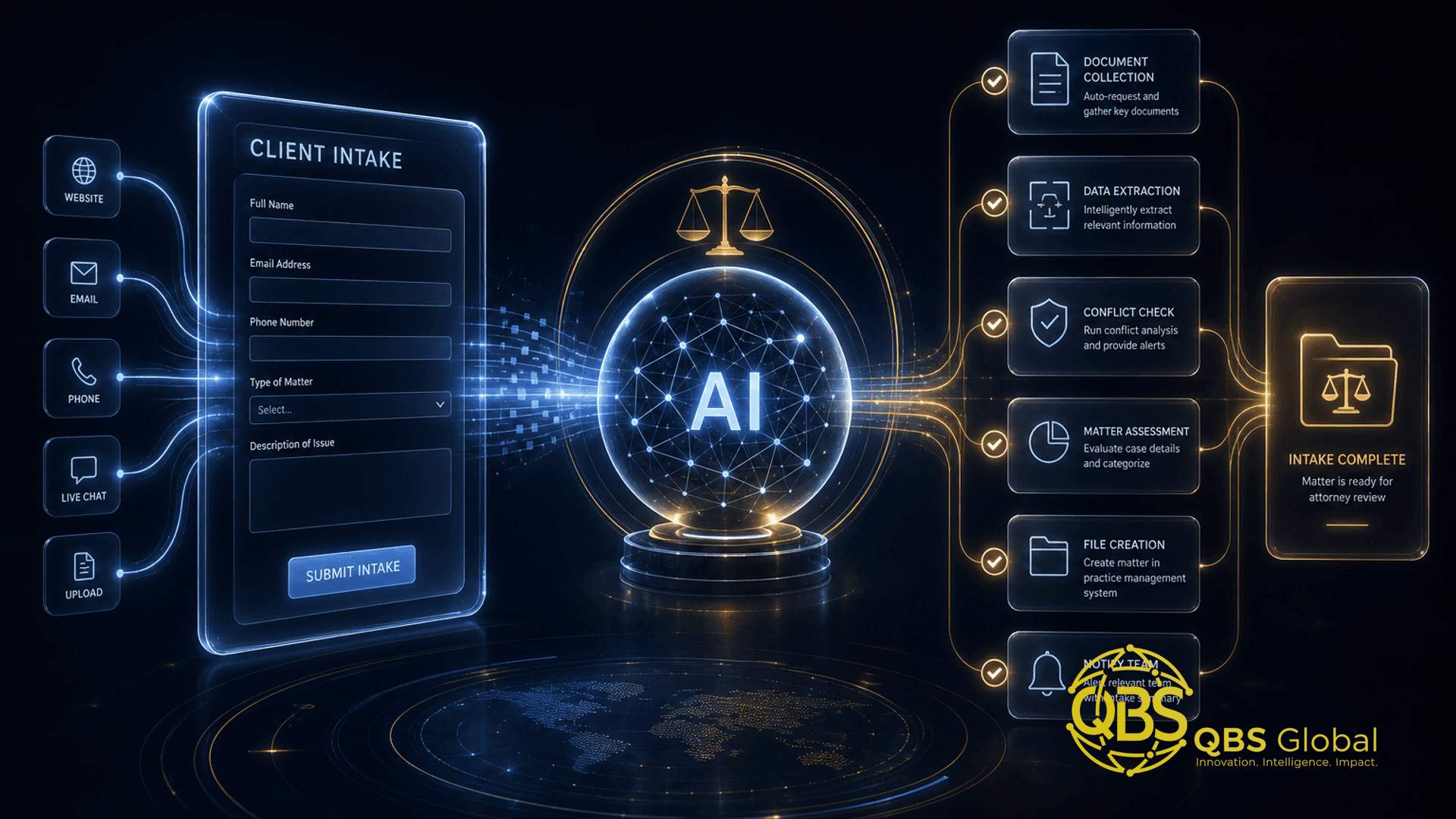
The mistake most firms make is bolting AI onto one step — usually a chatbot — and calling it done. The win comes from automating the handoffs between steps so nothing waits on a human to remember it. Here is the full chain, with the human-judgment checkpoints marked.
| Stage | What happens | Who decides |
|---|---|---|
| 1. Capture | Inquiry arrives (form, chat, call, ad). AI greets, asks qualifying questions, captures details 24/7 | Automated |
| 2. Qualify | AI classifies the matter type, flags out-of-scope or low-value matters, scores urgency | Automated, with rules you set |
| 3. Conflict pre-check | AI cross-references parties named against your client and matter database, surfaces possible hits | AI drafts, lawyer clears |
| 4. Engagement | Engagement letter drafted from the right template, pre-filled with captured details | AI drafts, lawyer approves and sends |
| 5. Matter creation | New matter opened in practice management, folder created, e-signature requested | Automated after approval |
| 6. Handoff | Responsible attorney notified, kickoff or consult booked, client gets a confirmation | Automated |
The principle running through all six stages: automate the typing and the chasing, keep the human on the judgment. The AI never clears a conflict, never finalizes legal terms, and never moves money on its own. It removes the copy-paste and the 24-hour gaps — which is where conversion is actually lost.
This same pattern — automate the mechanical steps, insert AI only where judgment is needed, keep a person on the final call — is the backbone of client onboarding automation for any service business. Law firms just have stricter checkpoints baked in.
Where the AI earns its keep
Not every step needs AI. A form submission triggering a matter folder is plain automation — a connector firing a rule. AI earns its place at the messy, language-heavy points: reading a free-text description of a legal problem and routing it to the right practice area, drafting a tailored engagement letter, or summarizing a 20-minute intake call into a clean matter note. Use it there, and leave the deterministic steps to ordinary automation. This is the same discipline that decides which business processes to automate first — match the tool to the messiness of the step.
Conflict checks, engagement letters, and matter creation, automated
These three are the steps that make legal intake different from a generic sales funnel. Each one carries ethical weight, so each one keeps a human in the loop — but the manual labor around them is exactly what automation should strip out.
Conflict checks. The ethical decision stays with a lawyer. What automation removes is the search-and-assemble grind: an AI agent takes the parties named during intake, queries your existing client and matter records plus any adverse-party lists, and returns a ranked list of possible conflicts with the matching records attached. The lawyer reviews a clean summary instead of running five manual searches. The clearance is still human; the legwork is not.
Engagement letters. Once a matter clears, the AI assembles the right letter from your approved template library — the correct version for that practice area and jurisdiction — and pre-fills the client name, scope, fee structure, and dates captured during intake. The lawyer reviews, edits if needed, and sends for e-signature. You are not letting AI write legal terms from scratch; you are letting it eliminate the copy-from-form-into-template step that wastes 20 minutes per matter and introduces typos.
Matter creation. After the signed letter comes back, automation opens the matter in your practice management system, creates the document folder structure, copies intake notes into the file, and notifies the responsible attorney. No one re-types the client's details for the fourth time.
The takeaway: in legal intake, automation's job is to do everything around the three ethical checkpoints — the searching, drafting, filing, and notifying — so the lawyer spends their attention only on the judgment calls that actually require a lawyer.
Conversational intake vs forms: what changes
A static web form is a wall of fields a stressed prospect has to fill in alone, often on a phone, with no one answering questions. A conversational intake — chat or voice — asks one thing at a time, adapts the next question to the last answer, and responds instantly at any hour. For a first contact, that difference shows up directly in conversion.
| Static form | Conversational AI intake | |
|---|---|---|
| Availability | 24/7, but passive | 24/7 and interactive |
| Question flow | Fixed, every field for everyone | Branches on answers, skips the irrelevant |
| Qualification | After a human reads it | In real time, during the conversation |
| Drop-off | High on long forms | Lower — feels like a conversation, not a chore |
| Best for | Clients who want to self-serve | First contact and after-hours capture |
The reason this matters is timing. Most prospects sign with the first firm that responds, and a form that sits in an inbox until morning has already lost to a competitor whose intake replied at 9:05pm. A conversational layer closes that gap by qualifying and acknowledging the prospect the moment they arrive.
The practical answer is not "forms or conversation" — it is both, with conversation leading. Use an AI conversation for first contact and after-hours, and offer a short structured form for the minority who prefer to type into fields. The conversational path captures richer context and hands a pre-qualified summary to your team; the form stays as a fallback. (This is one of several high-leverage AI use cases for professional-services firms, where the same conversational pattern applies to consultations and discovery calls.)
The takeaway: lead with conversational intake for speed and context, keep a form as a fallback, and you capture the after-hours prospects most firms quietly lose.
Build vs buy: legal-SaaS suites vs a custom workflow
This is the decision that determines your cost and your timeline, and the honest answer is: most firms should start by buying and build only the one piece the suite cannot handle.
Off-the-shelf legal practice management and intake suites already bundle intake forms, e-signature, conflict-check fields, and matter creation. If your matter types are standard and your volume is moderate, a suite is faster to deploy and cheaper to start. You are buying a covered set of features and a vendor's roadmap.
A custom workflow makes sense when the suite hits its limits: when your intake spans systems no single product joins cleanly (your CRM, your accounting tool, a niche document platform), when your qualification or routing logic is genuinely a competitive edge, or when per-seat pricing on a growing team makes a tailored build cheaper over a two-to-three-year horizon.
| Factor | Buy a legal-SaaS suite | Build a custom workflow |
|---|---|---|
| Time to live | Days to a few weeks | Weeks to a couple of months |
| Upfront cost | Low (subscription) | Higher (one-time build) |
| Ongoing cost | Per-seat fees, rise with headcount | Hosting + maintenance, flatter |
| Fit to your process | Good for standard intake | Exact — shaped to your matter types |
| Integration reach | Limited to the vendor's connectors | Anything with an API |
| Best when | Standard matters, modest volume | Unusual workflows, scale, or edge as a moat |
In practice the smart move is a hybrid: run the suite for the standard 80% of intake, and commission a custom AI layer for the 20% it cannot do — usually the conversational front door, a cross-system conflict pre-check, or routing logic the vendor does not support. We go deeper on this exact tradeoff in our guide to build vs buy for AI agents in service firms; the framework there applies cleanly to legal intake.
The takeaway: buy the suite for standard intake, build custom only for the workflow that is your edge or that no vendor joins — and combine them rather than treating it as either/or.
Integration and data-handling considerations for legal
Intake automation touches privileged, confidential client information from the first message. That raises the bar above a generic marketing automation, and it is the part you cannot afford to get wrong.
Confidentiality and model training. The single most important contract term: your client data must be excluded from any vendor's model training, in writing. Use enterprise or business tiers of AI providers that contractually guarantee this, not consumer chat tools. If a vendor cannot say in their data processing agreement that your inputs are not used to train models, they are not a fit for legal intake.
Data residency and the DPA. Know where the data physically lives and sign a data processing agreement with every vendor in the chain — the AI provider, the practice management system, the e-signature tool. For firms with clients in regulated regions, residency and processing location can be a hard requirement, not a nice-to-have. Map the whole data path before you wire anything.
Audit trails. Every automated action — every conflict pre-check, every drafted letter, every matter opened — should be logged with a timestamp and a record of who approved it. When automation touches ethical steps, you need to be able to show exactly what the system did and who signed off.
Integration reality. The value of intake automation is killed by data silos. The workflow only works if the conversational layer, the conflict database, the document templates, and the practice management system can actually talk to each other through APIs. Before committing to any tool, confirm it has the integration hooks to connect to the systems you already run. A pretty chatbot that cannot write to your matter system just creates a new copy-paste job.
The takeaway: in legal, the data-handling design is the project. Contractual no-training terms, signed DPAs, full audit logs, and real API integration are the non-negotiables that separate a safe build from a liability.
Piloting one workflow and measuring time saved
Do not try to automate the whole intake chain at once. Pick one workflow, prove it, then extend. The right first pilot is almost always first-response and qualification — it is where prospects are lost fastest, it touches no money or final legal terms, and it is the easiest to measure.
Here is the pilot in steps:
- Baseline first. Before you change anything, record three numbers for your current intake: average response time to a new inquiry, staff hours spent per intake, and your lead-to-signed-client conversion rate. Without a baseline, you cannot prove the build worked.
- Scope one workflow. Limit the pilot to after-hours and weekend inquiries for one or two matter types. Small enough to ship in weeks, real enough to produce data.
- Build the front door. Stand up the conversational capture, the qualification rules, and an instant acknowledgment that books a consult or promises a same-business-day call. Keep conflict clearance and engagement entirely manual for now.
- Run it for four to six weeks. Long enough to gather a real sample of intakes through the new path.
- Compare against baseline. Did response time drop? Did the conversion rate on after-hours leads rise? How many staff hours came back?
The numbers that justify the spend are faster response and higher conversion — because those turn directly into signed matters, and the benchmark gap between a 14% and a 40% conversion rate is enormous (LexGro). Hours saved is the bonus, not the headline. Once the first workflow proves out, extend one stage at a time: conflict pre-checks next, then engagement-letter drafting, then automated matter creation.
The takeaway: pilot the first-response workflow, measure it against a baseline you captured beforehand, and let conversion — not novelty — decide whether you extend.
If you are scoping a custom intake or document workflow for your firm and want a clear, vendor-neutral view of what to build versus buy, book a free 30-minute call with QBS Global and we will map a tailored intake automation roadmap for your practice — what to pilot first, what to integrate, and where AI genuinely fits — back to you within 48 hours.
Frequently asked questions
What does AI automation for law firm client intake actually do?+
It handles the busywork between a new inquiry and an opened matter: it captures lead details around the clock, runs a first-pass conflict check, drafts the engagement letter from a template, and creates the matter in your practice management system. A person still approves anything that carries legal or ethical weight, but the typing, copying, and chasing are automated, so prospects get a fast response instead of sitting in a 24-to-48-hour gap.
Is conversational AI intake better than a web form for law firms?+
For a first contact, usually yes. A conversational intake asks one question at a time, adapts follow-ups to the answers, and works at 2am — which matters because most prospects sign with the first firm that actually responds. Keep a short structured form for clients who prefer it, but lead with conversation: it captures more context and qualifies the matter before a human ever opens it.
Should a small firm build custom intake automation or buy a legal-tech suite?+
Buy first when an off-the-shelf suite covers your matter types and your volume is modest — it is faster and cheaper to start. Build custom when your intake spans tools no single product joins cleanly, your qualification logic is a competitive edge, or per-seat fees on a growing team make a tailored workflow cheaper over two to three years. Most firms start by buying and commission a custom layer only for the one workflow the suite cannot handle.
Is it safe to use AI for client intake given confidentiality rules?+
It can be, if you build for it: use vendors that contractually exclude your data from model training, keep privileged data inside systems with a signed data processing agreement, log every automated action for audit, and never let AI finalize a conflict clearance or engagement on its own. Treat the AI as a drafting and routing assistant with a lawyer approving the output, not as the decision-maker.
How do I measure whether intake automation is actually working?+
Pick a baseline before you start: average response time to a new inquiry, hours of staff time per intake, and your lead-to-signed-client conversion rate. Run the automated workflow for four to six weeks against the same intake types, then compare. Faster response and a higher conversion rate are the numbers that pay for the build; hours saved is the bonus.
Which intake workflow should a law firm automate first?+
Automate the first-response-and-qualification step first. It is where prospects are lost fastest, it does not touch money or final legal terms, and it is the easiest to measure. Once after-hours capture and instant follow-up are working, extend into conflict-check prompts, engagement-letter drafting, and matter creation one stage at a time.