How to Automate Client Onboarding for a Service Business (Step-by-Step + Where AI Fits)
How to automate client onboarding for a service business — a step-by-step system, the tools, and where AI agents add judgment instead of just forms.
You closed the deal. The client said yes, signed, and is excited. Then come the four days of silence while you manually send an invoice, dig up an intake form, create a folder, set up their account, and find a kickoff slot. By the time you surface, the excitement has cooled and the client is quietly wondering what they bought.
That gap is where service businesses lose the goodwill they just earned. This guide shows you how to close it — not with one Zapier tip, but with a full automated onboarding system: the stages, the tools that connect them, and the specific points where an AI agent adds judgment instead of just another form. We automate this busywork for a living, so treat this as a build plan from people who wire these systems, not a brochure. Every hard number is cited so you can check it.
Why manual onboarding quietly costs you clients
Onboarding is the first thing a client experiences after paying you. Get it wrong and you confirm their worst fear — that they made a mistake. The data backs this up: over 90 percent of customers feel the companies they buy from "could do better" at onboarding, and 86 percent say they'd be more likely to stay loyal to a business that invests in welcoming and educating them after the sale (Wyzowl). Onboarding is not admin. It is retention.
The hidden cost is your time. Manual onboarding is mostly data shuffling — copying a name from the contract into the invoice, into the project tool, into the welcome email, into the folder name. Around 76 percent of workers say they spend one to three hours a day just moving data from one place to another (Zapier). Every one of those handoffs is a place a step gets forgotten and a client gets left waiting.
And it does not scale. The manual process that feels fine at three clients a month becomes the reason you stop taking on the tenth. The time adds up: most small businesses using AI — 58 percent — report saving over 20 hours a month, roughly five hours a week (Zapier) — time that was going to copy-paste, not to the work clients actually pay for.
The takeaway: manual onboarding doesn't just cost hours. It costs the exact first impression that decides whether a client renews.
Map your current onboarding (the stages most firms share)
You cannot automate a process you haven't drawn. Before any tool, write down what actually happens between "client says yes" and "client is fully active." Almost every service business shares the same six stages, even if the labels differ.
| Stage | What happens | Typical manual pain |
|---|---|---|
| 1. Agreement | Proposal accepted, contract signed | Chasing a signature by email |
| 2. Payment | Deposit or first invoice paid | Manually creating and sending the invoice |
| 3. Intake | Collecting brand assets, logins, goals, scope details | Back-and-forth emails for missing info |
| 4. Setup | Creating their account, folders, project, channels | Copy-pasting the same details into 5 tools |
| 5. Kickoff | Scheduling and running the first call | Email ping-pong to find a time |
| 6. Activation | Client knows what happens next and who to contact | Nothing formal — they're left guessing |
Now mark each handoff — the moment one stage should trigger the next. Those handoffs are where time leaks: the signed contract that sits a day before anyone makes the invoice, the paid invoice that waits two days before setup starts. You are not automating the stages. You are automating the gaps between them. That reframing is the whole game.
While you map, note which steps are purely mechanical ("create a folder named X") and which need a human decision ("is this scope actually what we sell?"). Keep that distinction handy — it tells you later where rules end and AI begins.
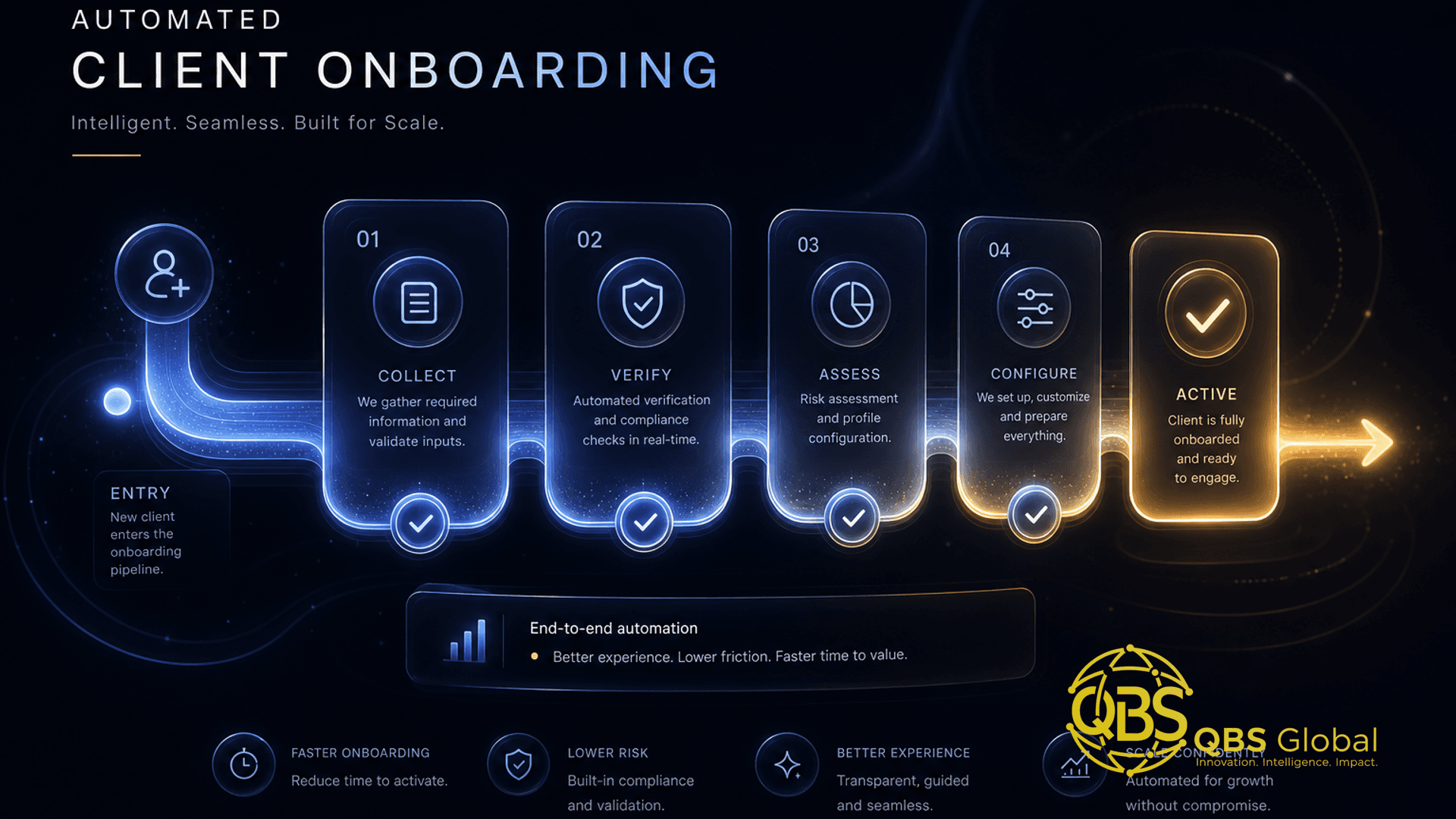
The automated client-onboarding system, step by step
Here is the system the map above becomes. Each step is triggered by the completion of the one before it, so the client moves forward without you pushing.
Step 1 — Signed contract triggers the invoice
When the e-signature platform marks the contract complete, it fires a trigger that creates and sends the first invoice automatically, pre-filled with the client's name and agreed amount. No human re-typing. The client gets a payment request within minutes of signing, while intent is highest.
Step 2 — Payment triggers setup and intake
A paid invoice is the cleanest trigger in the whole system. It kicks off two things at once: the back-office setup (create the client record, the project, the shared folder, the communication channel) and a single, well-designed intake form sent to the client. One trigger, two parallel jobs.
Step 3 — Intake submission triggers project population
When the client submits the intake form, their answers flow straight into your project tool — brand assets land in the folder, goals become the project brief, logins go into your password manager. This is the step that usually eats an afternoon of copy-paste. Automated, it's instant.
Step 4 — Completed setup triggers the kickoff booking
Once setup and intake are both done, the system sends the client a scheduling link tied to your real calendar, plus a short "here's what to expect" message. They book themselves. No ping-pong.
Step 5 — Kickoff triggers activation
After the kickoff call, an activation packet goes out automatically: who their point of contact is, where to find things, what happens in week one, and how to reach you. The client ends onboarding knowing exactly what comes next — which is precisely the gap that drives early churn.
The principle: every stage's exit is the next stage's trigger. You build the chain once; it runs every time a client signs. This is the core idea behind AI automation for service businesses — wiring outcomes to triggers so the busywork runs itself.
The tools that connect each stage
You do not need a single all-in-one platform. A strong onboarding system is usually a handful of focused tools joined by one connector. Here's the map by job.
| Stage | Tool category | Common examples | What it does |
|---|---|---|---|
| Agreement | E-signature | DocuSign, PandaDoc, Dropbox Sign | Captures the signature, fires the first trigger |
| Payment | Invoicing / payments | Stripe, Xero, QuickBooks | Creates the invoice, confirms payment as a trigger |
| Intake | Forms | Typeform, Tally, Google Forms | Collects structured client info in one pass |
| Setup | Project / CRM | Notion, Asana, ClickUp, HubSpot | Holds the client record, project, and folder |
| Kickoff | Scheduling | Calendly, Cal.com, SavvyCal | Lets the client self-book against your calendar |
| The glue | Connector | Zapier, Make, n8n | Listens for each trigger and fires the next step |
The connector is the part most people underestimate. It is what turns six separate tools into one system. A connector watches for an event in one app (contract signed) and performs actions in others (create invoice, create folder, send form). Off-the-shelf connectors handle the standard, well-defined handoffs cheaply and reliably.
When you outgrow connectors: the off-the-shelf glue strains when a step needs real logic — branching by service type, reconciling data across systems that don't share IDs, or handling free text instead of clean fields. That is the line where a custom build earns its keep, and where the cost of process automation is worth modelling before you commit. For most firms, start with the connector and only build custom where it visibly breaks.
Where AI agents add judgment (and where they shouldn't)
Connectors handle "if this, then that." They are brilliant at predictable steps and useless the moment a step needs a decision. That's the line between automation and AI.
An AI agent earns its place at the onboarding steps that used to require a person to read, decide, or write. The best spots:
- Reading messy intake replies. Clients ignore your tidy form fields and paste a paragraph. An agent extracts the scope, budget, and goals from free text and writes them into structured fields — the copy-paste judgment a human used to do.
- Drafting the welcome and activation messages. Instead of a generic template, an agent writes a message grounded in this client's stated goals, then routes it to you for a one-click approve.
- Flagging incomplete or risky intake. An agent notices the client left out their logins, or that the stated scope doesn't match what they paid for, and raises a flag before kickoff instead of after.
- Triaging which new clients need a human touch first. Not every onboarding is equal; an agent can spot the high-value or high-risk ones and bump them to you.
These are exactly the kinds of judgment tasks covered in our guide to AI use cases for professional-services firms — the steps where a model reads context and decides, rather than just moving fields.
Now the guardrails. AI should not auto-send contracts, move money, or finalize legal or pricing terms unsupervised. Anything irreversible or legally binding stays rule-based with a human approving the final action. The pattern that works: AI drafts and proposes, a person approves, the connector executes.
| Step | Use a rule (connector) | Use an AI agent | Keep a human in the loop |
|---|---|---|---|
| Send invoice on signature | ✅ | ||
| Create folder, project, account | ✅ | ||
| Read free-text intake reply | ✅ | ||
| Draft tailored welcome message | ✅ | ✅ approve before send | |
| Flag scope mismatch | ✅ | ✅ | |
| Send contract or change pricing | ✅ human action only |
The rule of thumb: rules for what's predictable, AI for what needs reading or writing, a human for what's irreversible.
A worked example: onboarding automated end to end
Take a marketing agency that signs a new retainer client. Here's the same morning, before and after.
Before (manual): The contract gets signed at 9am. The owner sees it after lunch, makes an invoice in QuickBooks, emails it. Two days later, payment clears; the owner notices the next morning, creates a Notion page, a Google Drive folder, a Slack channel, then emails a Word-doc intake form. The client fills half of it. The owner chases the rest, copies the answers into Notion by hand, then emails back and forth to find a kickoff time. Elapsed: about a week. Owner time: a few scattered hours of copy-paste. That fits the pattern where roughly 76 percent of workers lose one to three hours a day just shuttling data between tools (Zapier).
After (the system):
- 9:00am — Client signs in PandaDoc. The connector fires.
- 9:01am — Stripe invoice auto-generated and emailed, pre-filled with the client's name and retainer amount.
- 10:30am — Client pays. Payment is the trigger: the connector creates the Notion client page, the Drive folder, and the Slack channel, and emails a Tally intake form — all in parallel.
- 11:00am — Client submits intake. An AI agent reads their free-text answers, writes the goals and scope into the Notion brief, drops brand assets in the folder, and drafts a welcome message grounded in their stated goals.
- 11:02am — The owner gets one notification: "Acme onboarded. Welcome message drafted — approve?" One click sends it, with a Cal.com kickoff link attached.
- Same afternoon — Client self-books kickoff. After the call, the activation packet sends itself.
Elapsed: a few hours, mostly waiting on the client. Owner involvement: one approval click. The owner did the judgment (approve the welcome) and the system did the coordination. That is the difference between automating tasks and automating the system.
Your first week: what to automate first
Do not try to build all six stages at once — you'll stall. Automate the single handoff where deals most often go quiet after a "yes," then add the next. Here's a realistic first week.
| Day | Focus | Outcome |
|---|---|---|
| 1 | Map your six stages and mark the handoffs | A drawn process you can automate against |
| 2 | Pick the tools you already use per stage | No new platform — connect what you have |
| 3 | Automate Step 1: signed contract triggers the invoice | The most common stall point, gone |
| 4 | Automate Step 2: payment triggers setup + intake form | Setup starts itself the moment you're paid |
| 5 | Test with a fake client end to end, then go live | A working spine, watched once before trusting it |
Start with the contract-to-invoice and payment-to-intake handoffs because that's where momentum dies right after a client commits — and they're the easiest wins to ship. Add the AI judgment steps (reading intake, drafting welcomes) once the rule-based spine is solid. Build one link in the chain, prove it, then add the next.
The takeaway: a working two-step system beats a perfect six-step plan you never finish. Ship the spine this week.
If you'd rather not wire this yourself, that's the work we do — mapping your onboarding, connecting your existing tools, and adding AI only where it earns its place. Book a free 30-minute call with QBS Global and we'll send you a tailored onboarding-automation roadmap within 48 hours.
Frequently asked questions
How do I automate client onboarding for a service business?+
Map your onboarding stages first (signed to kickoff to active), then automate the handoffs between them: a signed proposal triggers an invoice and an intake form, a paid invoice triggers account and folder creation, and a completed intake triggers a kickoff booking. Use a connector like Zapier or Make to fire each step, and add an AI agent only at the points that need judgment, like reading a messy intake reply or drafting a tailored welcome.
What is the difference between an onboarding workflow and an onboarding system?+
A single workflow is one automation, like an invoice that sends itself. A system is the full chain from signed contract to active client, where each stage's completion automatically triggers the next, so nothing waits on you to remember it. The system is what removes the gaps where clients usually go quiet.
Which onboarding tasks should I automate first?+
Automate the contract-to-invoice handoff and the intake-form collection first, because they are the steps where deals most often stall after a client says yes. They are also the easiest to automate with off-the-shelf tools and the fastest to show time saved.
Where should AI agents be used in client onboarding, and where should they not?+
Use AI agents for judgment steps: reading and routing a free-text intake reply, drafting a context-aware welcome message, or flagging an incomplete form. Do not let AI auto-send contracts, move money, or finalize legal or pricing terms without a human approving first — keep those rule-based with a person in the loop.
How much time does manual client onboarding actually waste?+
It adds up fast. Roughly 76 percent of workers report spending one to three hours a day just moving data between tools, and most small businesses that adopt AI (about 58 percent) report saving over 20 hours a month — roughly five hours a week — once they automate the repetitive coordination that onboarding is full of.
Do I need custom software to automate onboarding, or are off-the-shelf tools enough?+
Most service businesses can build a strong onboarding system on off-the-shelf tools (e-sign, invoicing, forms, scheduling, plus a connector). You only need custom work when the workflow spans systems no single tool joins cleanly, the logic is your competitive edge, or per-seat fees on a growing team make a build cheaper over two to three years.