Automate Your Project Status Reports with AI: A Step-by-Step Setup for Service Firms
A vendor-neutral guide to building an AI project status report generator for agencies — what to wire up, which templates to use, and how to keep it honest.
Search interest in "AI status report" was effectively flat through mid-2025 and has been climbing since — riding the same curve as "AI agents." By 2026 the tool market is crowded: Taskade publishes a "13 best AI project report generators" list, ClickUp Brain and Monday AI both ship status-report features, and standalone tools like Manus and Quillbot pitch one-click reports. When that many vendors chase the same keyword, the demand underneath it is real.
Here's what almost none of those pages tell you: how to actually wire this up for a small agency without buying their tool. This is the operator's version — what data a status report pulls from, how to assemble one automatically, which templates to keep, and how to stop the AI from quietly lying to your clients.
Why status reporting is the highest-ROI PM task to automate
If you automate one project-management task this quarter, make it status reporting. The math is lopsided in your favor.
Status reports are high-frequency, low-judgment, and structurally repetitive — the exact profile of work AI handles well. You write the same report every week, for every account, pulling from the same handful of sources, in roughly the same shape. That's a template with variables, not a creative act.
The time it eats is not small. McKinsey research has long found that middle managers lose a large share of their week to administrative work rather than actual managing (McKinsey, via The Consulting Report) — and reporting is a chunk of that. And it is exactly the layer the analysts expect AI to absorb: Gartner's well-known forecast is that by 2030, 80% of today's project-management tasks will be eliminated as AI takes over data collection, tracking, and reporting (Gartner, via tcworld). Note the wording — tasks, not project managers. Reporting is squarely in that 80%.
For an agency the leverage compounds. You don't write one status report — you write one per client, every week. A 5-person shop running eight accounts is producing eight reports weekly, or roughly 400 a year. Shave 20 minutes off each and you've recovered well over a hundred hours annually that you can bill, or spend actually delivering. This is the same logic behind any AI workflow automation for service-business operations: pick the task you repeat most, automate the assembly, keep the judgment.
Takeaway: Status reporting is repetitive, frequent, and multiplied across accounts. That makes it the single highest-ROI place a small agency can apply AI.
What data an AI report pulls from (and where it lives)
An AI report generator is only as good as the data it reads. It knows nothing about your projects — it summarizes whatever you point it at. So the first job is mapping where your project truth actually lives. For most agencies it's scattered across four or five systems:
| Data type | Where it usually lives | What the report uses it for |
|---|---|---|
| Task status, due dates, owners | Project tracker (Asana, ClickUp, Monday, Jira, Notion) | "What moved, what's late, what's next" |
| Hours and budget burn | Time tracking (Harvest, Toggl, tracker built-in) | Budget-vs-actual, capacity flags |
| Blockers and decisions | Team chat (Slack, Teams) | "What we're waiting on from you" |
| Bugs and tickets | Issue tracker / helpdesk | Open issues, severity, resolution |
| Milestones and scope | The project plan or SOW | Phase progress, scope-change flags |
The uncomfortable truth: the AI's job is easy; cleaning the source is the hard part. If half your tasks have no owner and stale due dates, the report will confidently summarize garbage. Manual reporting is still endemic — Wellingtone's survey found 42% of PMOs spend at least one full day every month just compiling reports by hand (PMI/Wellingtone data, via PM Study Circle). If that's you, fix data hygiene before you automate, or you'll just ship polished nonsense faster.
Practical rule: pick one or two clean sources to start, not all five. A report built from your tracker plus your time tool is 80% of the value and a fraction of the wiring.
Step-by-step: wiring an automated status report for a small agency
Here's the concrete build for a 5-person agency, assuming no engineering team and a normal SaaS stack. The whole thing is roughly a week of part-time effort.
Step 1 — Pick the one report that hurts most
Don't automate everything. Choose the single report you dread writing — usually the weekly client update. One report type, one client format. You'll generalize later.
Step 2 — Designate the source of truth
Decide which system the report reads from and commit to keeping it current. For most agencies that's the project tracker. From this point, the rule is simple: if it's not in the tracker, it doesn't exist for reporting. This discipline alone improves reports more than any AI.
Step 3 — Choose the assembly layer
You have three honest options, cheapest first:
- Built-in AI in your tracker. ClickUp Brain, Notion AI, Asana Intelligence, and Monday AI can draft a status summary from board data with no extra tooling. Start here if you live in one of those.
- A connector (Zapier, Make, or n8n). This pulls data from multiple tools, hands it to an AI model, and drops the draft into a doc or Slack. n8n is the open-source, self-hostable option if you want to avoid per-task fees.
- A direct call to a model (ChatGPT, Claude) via a saved prompt. The manual-but-fast path: paste your week's tracker export into a reusable prompt. Zero setup, no automation — good for testing your prompt before you wire anything.
Step 4 — Write the prompt once, reuse it forever
The prompt is the actual product. Tell the model its role (an agency PM), the audience (the client), the exact sections you want, the tone, and — critically — what to do when data is missing or ambiguous (flag it, never guess). A good prompt with mediocre tooling beats great tooling with a lazy prompt.
Step 5 — Route the draft to a human, then to the client
The output lands somewhere a person sees it before the client does — a Slack channel, a draft doc, an email draft. Never auto-send to a client. We'll come back to why this is non-negotiable.
Step 6 — Schedule it
Once you trust the draft quality, trigger it on a schedule — every Friday at 2pm, ready for a human pass before the end-of-week send. This is where the time savings actually land.
If this sequence feels familiar, it's the same backbone as how you'd automate client onboarding for a service business: map the data, pick the source of truth, automate the assembly, keep a human at the gate.
Templates: client-facing vs internal vs exec summary
The same underlying data should produce three different reports for three different audiences. Most agencies wrongly send one report to everyone — the client gets too much internal noise, leadership gets too much detail. Split them.
| Client-facing | Internal delivery | Exec / portfolio summary | |
|---|---|---|---|
| Audience | The client contact | Your delivery team | Agency owner / account lead |
| Length | Short, scannable | Detailed | One line per account |
| Tone | Confident, plain-English | Direct, candid | Numbers-first |
| Includes | Progress, what's next, what we need from you | Blockers, capacity, budget burn, risks | Status color, budget %, one risk flag |
| Leaves out | Internal blame, raw hours, team friction | Client politeness padding | Everything except exceptions |
Client-facing answers three questions: what got done, what's next, and what we need from you — nothing about who dropped the ball. Internal is where the honest mess lives: at-risk tasks, over-budget accounts, an under-water teammate. Exec is a single row per client so the owner can scan twenty accounts in two minutes and only dig into the red ones.
The beauty of an AI generator: one data pull, three prompts. A human writing three versions does three times the work; the AI does it for the cost of two extra prompts. That's the structural reason this beats manual reporting.
Keeping a human in the loop so reports stay honest
This is the section the tool vendors skip, and it's the one that protects your agency's reputation.
AI status generators have one dangerous failure mode: they state guesses with the same confidence as facts. Ask for a status on a task with no recent activity and a sloppy setup will write "on track" because that's the statistically likely phrasing — not because anything actually is. Ship that to a client and you've manufactured a trust problem out of thin air.
Three guardrails keep it honest:
- AI drafts, a human sends — always, for anything client- or revenue-facing. The generator does the 90% of assembly and writing. A delivery lead spends two minutes adding the one piece of context the data can't see and catching anything off. Non-negotiable for client work.
- Forbid invention in the prompt. Instruct the model explicitly: if a status isn't clear from the data, mark it "needs confirmation" rather than guessing. A report that admits uncertainty is more trustworthy than one that's confidently wrong.
- Watch the first month closely. Read every generated report against reality for the first few cycles. You're calibrating trust, not installing-and-forgetting. Only move to autopilot once the drafts have earned it.
The rule: Automate the draft, keep a human on the send button. AI removes the typing, not the accountability.
This is the same human-in-the-loop principle that separates real AI project management for teams from the hype — the machine handles the busywork, a person still owns the judgment and the relationship.
Tool options vs a custom build
Should you buy an off-the-shelf generator or build your own? For most small agencies the answer is "neither, yet" — start with what you own. Here's the honest comparison.
| Built-in tracker AI | Standalone report tool | No-code connector (Zapier/n8n) | Custom build | |
|---|---|---|---|---|
| Setup effort | Lowest | Low | Medium | High |
| Monthly cost | Often included | Low (from roughly $6/mo) | Low–medium | One-time build + hosting |
| Pulls from multiple tools | Usually no | Sometimes | Yes | Yes |
| Custom templates | Limited | Limited | Good | Total |
| Best for | You live in one tracker | You want a quick win | Data in 2–3 tools | Reporting is a real cost center |
Start with built-in AI or a connector. They cover the overwhelming majority of agencies, cost little, and you can ship this week. The market proves the demand is real — Taskade's report on AI report generators lists its top pick with auto-scheduled reports from around $6/month — but the existence of cheap tools is also the reason you rarely need a custom build on day one.
When a custom build earns its place: your data lives in five disconnected systems, your reporting format is genuinely non-standard, you're producing hundreds of reports across many accounts, or you need it wired into client portals and billing. That's when an off-the-shelf tool starts fighting you and a tailored AI workflow automation pays back fast. The trigger is hours-saved-per-month crossing the build cost — not "wouldn't it be cool."
Rolling it out without disrupting your current process
The fastest way to kill an automation is to flip it on for everyone and have the first report be wrong in front of a client. Roll it out in parallel instead.
- Run it shadow-mode for two cycles. Generate the AI report alongside your existing manual one. Don't send the AI version — compare them. Where do they diverge? Usually the AI catches something you missed, or exposes a data-hygiene gap. Fix the gaps.
- Switch one account first. Pick your most forgiving client, send the AI-assisted report (after a human pass), and watch the reaction. No reaction is the goal — it should be indistinguishable from your best manual work.
- Expand one account per week. Don't migrate all eight at once. Each new account surfaces a data quirk; staggering keeps fixes small.
- Standardize the source data as you go. Every rollout exposes inconsistent task naming, missing owners, stale dates. Tightening these is half the real value — you end up with a cleaner project system, not just faster reports.
The teams that struggle here are usually short on someone to own the operational discipline — keeping the tracker clean, holding the human-review line, calibrating the prompts. If that ownership gap is your real problem, more tooling won't fix it; a dedicated operator will. That's the case for thinking about outsourced project management — the report generator removes the typing, but someone still has to own that the data underneath it is true.
Takeaway: Roll out in parallel, one account at a time. The goal isn't a flashy launch — it's a switch nobody notices because the reports just keep getting better.
If reporting is quietly eating a day a week across your team, that's exactly the kind of busywork we automate — and we'll map it to your actual stack, not a tool we're trying to sell you. Book a free 30-minute call with QBS Global and we'll sketch a tailored status-report automation roadmap for your agency within 48 hours.
Frequently asked questions
What is an AI project status report generator for agencies?+
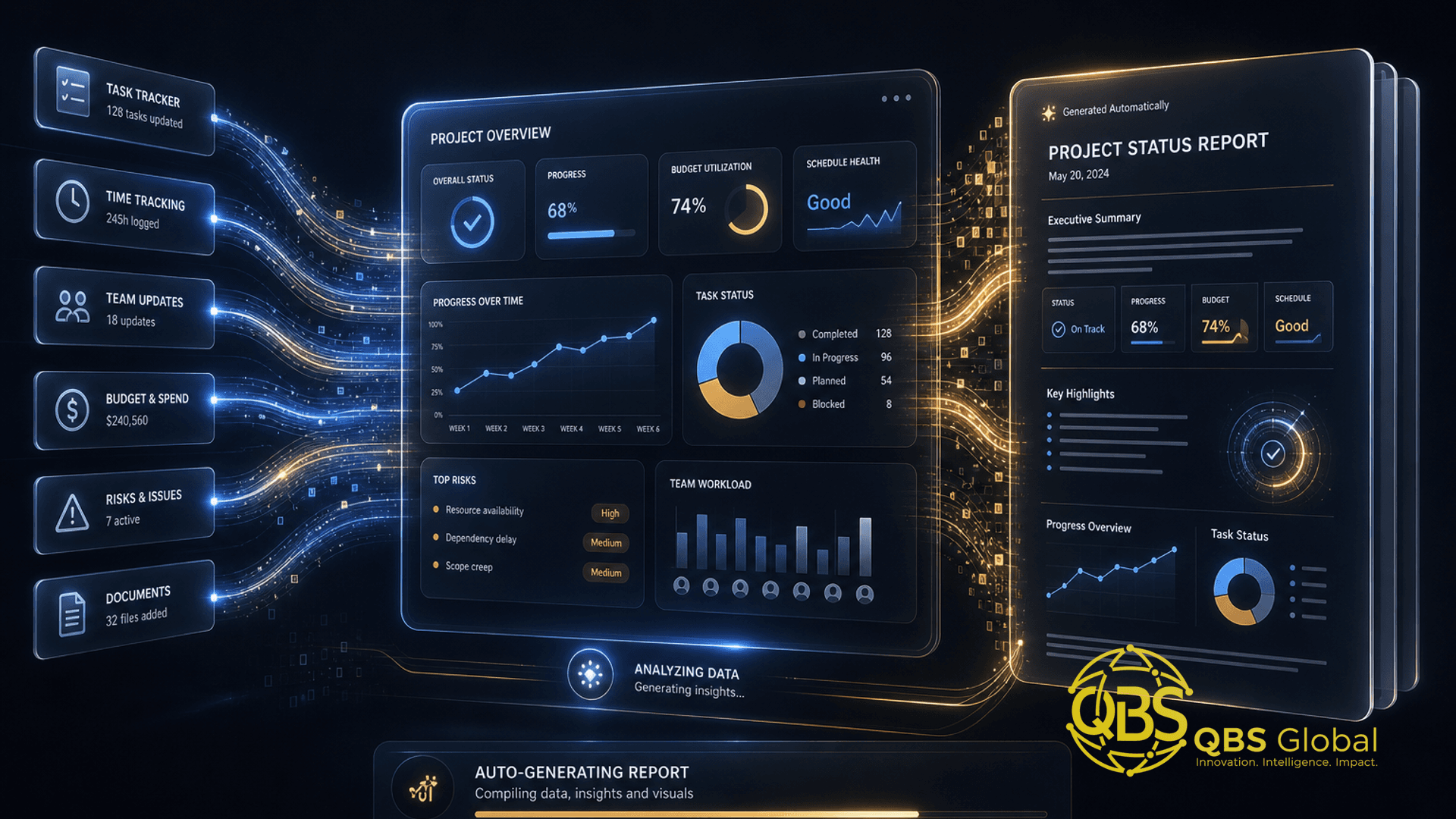
It is an automated workflow that reads your project data — tasks, time logs, chat threads, tickets — and drafts a written status update without anyone typing it from scratch. For agencies it usually produces three versions from the same data: a client-facing summary, an internal delivery report, and a one-line exec roll-up across all accounts.
Do I need to buy a new tool to automate status reports?+
No. Most small agencies already own everything they need. The built-in AI inside your existing tracker (ClickUp, Asana, Monday, Notion) plus a connector like Zapier or n8n can assemble a report from data you already capture. Buying a separate report tool is optional, and a custom build only pays off once reporting is genuinely eating hours every week.
Will an AI-generated status report make my agency look lazy to clients?+
Only if you ship it raw. The honest model is AI-drafts, human-sends: the generator does the assembly and writing, a delivery lead spends two minutes adding context and the one judgment call that matters, then it goes out. Clients judge clarity and reliability, not whether a human typed every word.
What data does an AI status report actually pull from?+
Whatever your team already touches: task status and due dates from your project tracker, hours from time tracking, blockers from chat, bugs from your ticket system, and milestones from your plan. The quality of the report is capped by how clean that source data is — garbage in, confident garbage out.
How do I keep AI status reports accurate and honest?+
Keep a human on the send button for anything client- or revenue-facing, and never let the AI invent a status it cannot trace to source data. Give it a rule to mark anything it is unsure about as 'needs confirmation' rather than guessing, and review the first month of reports closely before trusting the workflow on autopilot.
How long does it take a 5-person agency to set this up?+
Roughly a week of part-time effort. A day to pick the one report that hurts most and clean its data source, a day or two to wire the connector and write the prompt, then a couple of reporting cycles running it in parallel with your old process before you switch over. Start with one report type, not all three at once.